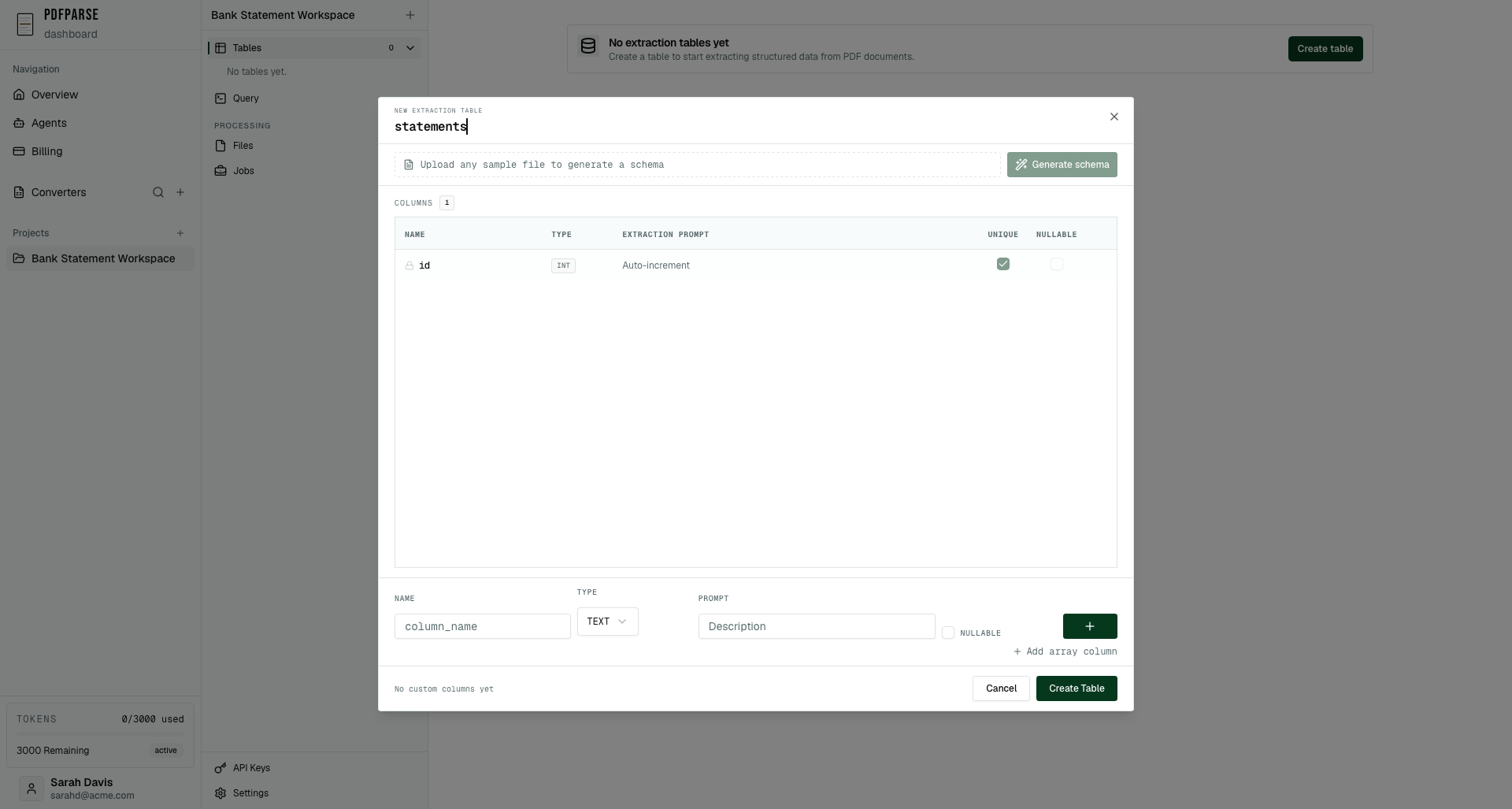
This tutorial shows how to model bank statements in PdfParse using a hybrid approach: store statement-level metadata as structured columns while capturing individual transactions in a JSON array field. This design gives you the best of both worlds - strongly-typed statement data for reliable queries plus flexible transaction storage that adapts to varying formats across different banks.
Demo placeholder (swap in your own clip):
<video controls width="100%" poster="/blog/placeholders/bank-demo-poster.png">
<source src="/blog/bank-statement.webm" type="video/webm" />
<source src="/blog/bank-statement.mp4" type="video/mp4" />
</video>
1) Schema: parent + array field
bank_statement:id,account_holder,account_number,statement_period_start,statement_period_end,opening_balance,closing_balance,purchases_json(array/JSON).
Copyable schema (table)
bank_statement
| key | type | prompt |
|---|---|---|
| account_holder | string | ”Name of the account holder” |
| account_number | string | ”Masked account number if present” |
| statement_period_start | date | ”Start date of the statement period” |
| statement_period_end | date | ”End date of the statement period” |
| opening_balance | number | ”Opening balance for the period” |
| closing_balance | number | ”Closing balance for the period” |
| purchases_json | array | ”Array of transactions: objects with date, merchant, amount, etc.” |
Copyable schema (JSON)
{
"bank_statement": {
"fields": [
{ "key": "account_holder", "type": "string", "prompt": "Name of the account holder" },
{ "key": "account_number", "type": "string", "prompt": "Masked account number if present" },
{ "key": "statement_period_start", "type": "date", "prompt": "Start date of the statement period" },
{ "key": "statement_period_end", "type": "date", "prompt": "End date of the statement period" },
{ "key": "opening_balance", "type": "number", "prompt": "Opening balance for the period" },
{ "key": "closing_balance", "type": "number", "prompt": "Closing balance for the period" },
{
"key": "purchases_json",
"type": "array",
"prompt": "Array of transactions; each object has date, merchant, amount, category, memo, payment_method"
}
]
}
}
2) Why use an array for transactions
Flexibility meets simplicity: Bank statements vary widely across institutions - some include merchant categories, others show memo fields, and payment methods differ by account type. A JSON array handles this variability gracefully:
- Compact storage: Statements typically contain dozens or hundreds of transactions; storing them as a JSON array keeps your schema lean and efficient.
- Variable attributes: Different banks expose different metadata (merchant categories, memo lines, payment methods, check numbers). Arrays avoid sparse columns and null-heavy tables.
- Simpler extraction: The AI model can capture all transaction attributes in one pass without needing complex foreign key relationships.
- Future flexibility: You can always migrate to a normalized child table later if you need stricter relational queries or joins across statements.
For many use cases - especially reconciliation, accounting imports, or basic analytics - JSON arrays provide the perfect balance between structure and flexibility.
3) Array configuration tips
Prompt engineering matters: To get clean, consistent transaction data, follow these best practices when configuring your purchases_json array field:
- Specify the structure: Set the field type to “array” and explicitly prompt it to return objects with consistent keys:
date,merchant,amount,category,memo,payment_method. - Add validation hints: Include instructions like “Return an array of objects; omit empty or placeholder transactions” to prevent the model from capturing headers or summary rows.
- Keep critical data separate: Store opening balance, closing balance, account holder, and statement period as scalar columns on the parent table. This lets you query and reconcile totals without parsing JSON every time.
- Type guidance: Remind the model that
amountshould be numeric (not a string like “$123.45”) anddateshould follow a consistent format.
Example prompt for purchases_json:
"Array of all transactions on this statement. Each transaction should be an object with: date (YYYY-MM-DD), merchant (string), amount (number, positive for credits/negative for debits), category (optional string), memo (optional string), payment_method (optional: 'debit', 'check', 'ATM', etc.). Omit summary rows and headers."
4) Querying JSON arrays in SQLite
SQLite’s JSON support is powerful: Once your data is extracted, you can query transaction arrays using SQLite’s built-in JSON functions. Here are practical examples:
Extract all transactions for a specific statement:
SELECT
json_extract(p.value, '$.date') AS transaction_date,
json_extract(p.value, '$.merchant') AS merchant,
json_extract(p.value, '$.amount') AS amount,
json_extract(p.value, '$.category') AS category
FROM bank_statement bs,
json_each(bs.purchases_json) AS p
WHERE bs.id = ?;
Find all transactions above a threshold:
SELECT
bs.account_holder,
json_extract(p.value, '$.date') AS date,
json_extract(p.value, '$.merchant') AS merchant,
CAST(json_extract(p.value, '$.amount') AS REAL) AS amount
FROM bank_statement bs,
json_each(bs.purchases_json) AS p
WHERE CAST(json_extract(p.value, '$.amount') AS REAL) > 1000.00;
Aggregate spending by category across all statements:
SELECT
json_extract(p.value, '$.category') AS category,
COUNT(*) AS transaction_count,
SUM(CAST(json_extract(p.value, '$.amount') AS REAL)) AS total_spent
FROM bank_statement bs,
json_each(bs.purchases_json) AS p
WHERE json_extract(p.value, '$.category') IS NOT NULL
GROUP BY category
ORDER BY total_spent DESC;
Reconcile statement balances:
SELECT
bs.statement_period_start,
bs.statement_period_end,
bs.opening_balance,
bs.closing_balance,
bs.opening_balance + SUM(CAST(json_extract(p.value, '$.amount') AS REAL)) AS calculated_balance,
bs.closing_balance - (bs.opening_balance + SUM(CAST(json_extract(p.value, '$.amount') AS REAL))) AS discrepancy
FROM bank_statement bs,
json_each(bs.purchases_json) AS p
GROUP BY bs.id;
5) Field mapping checklist
Ensure complete coverage: When setting up your bank statement schema, make sure you capture these essential fields:
Statement-level metadata (scalar columns):
account_holder(string): Full name or business name on the accountaccount_number(string): Masked/partial account number (e.g., “****1234”)statement_period_start(date): Beginning of the statement periodstatement_period_end(date): End of the statement periodopening_balance(number): Starting balance for this periodclosing_balance(number): Ending balance for this period- Optional:
bank_name(string),routing_number(string),account_type(string: checking/savings)
Transaction array (purchases_json):
Each transaction object should include:
date(string/date): Transaction date in YYYY-MM-DD formatmerchant(string): Merchant or payee nameamount(number): Transaction amount - ensure this is numeric, not a string like “$123.45”category(string, optional): Merchant category if availablememo(string, optional): Transaction description or memo linepayment_method(string, optional): “debit card”, “check”, “ATM”, “ACH”, etc.reference_number(string, optional): Check number, transaction ID, or reference
Type validation tip: Always specify that amounts should be numeric values. Banks often format amounts with currency symbols ($, €) or thousand separators (1,234.56) which can confuse extraction if not explicitly handled.
6) Testing and validation
Start small, iterate fast: Before processing hundreds of statements, validate your schema with a diverse sample set:
Initial validation:
- Process 3-5 sample statements from different banks/formats to test schema flexibility
- Export as SQLite and inspect the raw data - verify that
purchases_jsoncontains valid JSON arrays - Check data types: Run
SELECT typeof(amount) FROM (SELECT json_extract(value, '$.amount') as amount FROM bank_statement, json_each(purchases_json))to confirm amounts are stored as numbers, not strings - Review edge cases: Look for statements with refunds, fees, interest payments, or international transactions
Balance reconciliation:
-- This query should show zero or near-zero discrepancy
SELECT
account_holder,
opening_balance,
closing_balance,
(SELECT SUM(CAST(json_extract(p.value, '$.amount') AS REAL))
FROM json_each(purchases_json) p) AS total_transactions,
closing_balance - (opening_balance +
(SELECT SUM(CAST(json_extract(p.value, '$.amount') AS REAL))
FROM json_each(purchases_json) p)) AS discrepancy
FROM bank_statement;
If discrepancies appear, common causes include:
- Missing fee or interest transactions
- Incorrect sign handling (debits vs credits)
- OCR errors on amounts (e.g., “1.234.56” instead of “1234.56”)
Category validation: If merchant categories come out inconsistent or noisy, refine your prompt:
- Good: “Merchant category from statement if clearly present; otherwise leave null”
- Bad: “Categorize this merchant” (forces the model to guess)
7) When to use arrays vs child tables
Choose the right tool for your use case:
Use JSON arrays when:
- Transaction attributes vary significantly across different banks/statements
- You need fast, simple extraction without complex foreign key management
- Your primary queries aggregate totals rather than joining across transactions
- You’re building accounting imports, reconciliation tools, or simple analytics
Migrate to child tables when:
- You need to join transactions across multiple statements (e.g., “all Starbucks purchases across all months”)
- You want to add computed fields, tags, or enrichment data to individual transactions
- You’re building complex reporting that benefits from indexed, normalized data
- Performance becomes an issue with large transaction volumes
See our guide on building invoice extractors with child tables for the relational approach. You can always start with arrays and migrate to child tables later - PdfParse makes both patterns easy to implement.
8) Download your SQLite database
Once you’ve processed your bank statements and reviewed the extractions, you can download the complete SQLite database containing all your statement data including the JSON transaction arrays.
How to download:
- Navigate to Dashboard → Projects → [Your Bank Statement Project]
- Click on the Downloads tab in the navigation
- Click the “Download Database” button
- Save the
.sqlitefile to your local machine
Download demo placeholder (swap in your own clip):
<video controls width="100%" poster="/blog/placeholders/download-demo-poster.png"><source src="/blog/sqlite-download.webm" type="video/webm" /><source src="/blog/sqlite-download.mp4" type="video/mp4" /></video>
Breadcrumb navigation: Dashboard → Projects → [Your Project] → Downloads → Download Database
The downloaded SQLite file contains your bank_statement table with the purchases_json array field fully populated. You can immediately:
- Query transaction arrays using SQLite’s JSON functions (see section 4 above)
- Import into Python/Pandas for analysis
- Connect to Excel or Power BI for reporting
- Build reconciliation scripts or accounting integrations
See our detailed guide on integrating SQLite databases into your workflow for Python examples, API patterns, and advanced querying techniques.
Get started with bank statement extraction
Ready to automate your bank statement processing? Create an account and set up this template in minutes. Our product walkthrough shows the full extraction workflow in the launch article.
Related tutorials
Continue learning about structured document extraction:
- Build an Invoice Extractor with Child Tables and Foreign Keys - Learn the parent-child table pattern for invoices with line items
- Build a Resume Database with SQLite - Extract and query hundreds of resumes with powerful SQL integration
- Introducing PdfParse - Product overview and core features walkthrough
Need help with edge cases? Contact us at support@pdfparse.net if you’re handling:
- Multi-currency statements
- Complex fee structures
- International transaction formats
- Custom reconciliation rules
We’ll help you refine your schema and prompts to handle even the trickiest statement formats.