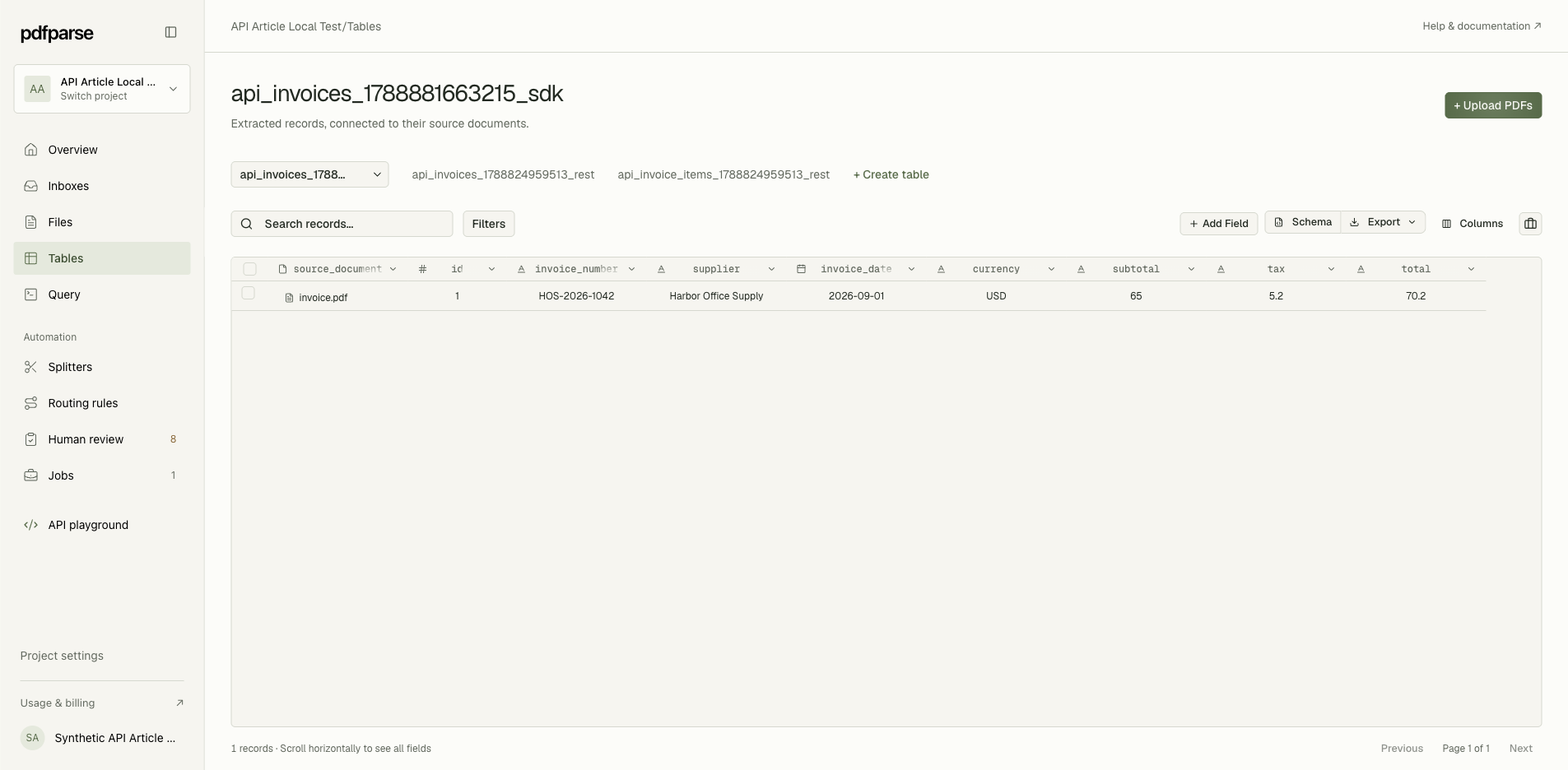
An invoice PDF contains a supplier, an invoice number, a total, and several purchased items. Your spreadsheet or accounting workflow needs those values in separate fields, with each item attached to the correct invoice. Copying text out of the PDF leaves that organizing work to you.
PdfParse turns PDF documents into structured, relational data. You define the fields you need, extract records into project tables, review them alongside their source documents, and export the result as SQLite, JSON, or CSV.
This introduction shows what that looks like with one invoice, how to choose a useful structure, and what to check before you use the output. The same approach applies to receipts, bank statements, purchase orders, and other documents with repeating records.
What PdfParse produces from a PDF
The useful result is a set of records with named fields and relationships. A schema is the definition of those fields: their names, types, and extraction instructions. It tells PdfParse which information belongs in each column.
For an invoice, the main table can hold one row per invoice. A related child table holds its line items, with each item linked to its parent invoice. Keeping these records separate lets you work with invoice totals and individual purchases without mixing the two.
| Information in the document | Where it belongs | Why the structure matters |
|---|---|---|
| Invoice number, supplier, date, currency, totals | Invoice table | One record represents the invoice as a whole. |
| Description, quantity, unit price, line total | Line-items child table | Each purchased item has its own row. |
| Original PDF | Linked source document | You can check a value against the document it came from. |
You choose the structure. PdfParse does not infer your business's accounting rules or guarantee that every extracted value is correct. A useful schema makes the intended result explicit; source review checks whether the extraction met it.
Is this the pdf-parse npm package?
This article introduces PdfParse at pdfparse.net, the hosted document-extraction product. If you arrived looking for require("pdf-parse") or pdfParse(buffer), you are looking for a similarly named Node.js package, rather than this product's dashboard or API.
For programmatic access to PdfParse, use the PdfParse API documentation. You can also use the dashboard without writing code.
Start with one representative document
Choose a PDF that resembles the documents you actually receive. A simple, clean sample is useful for learning the interface, but it cannot establish whether your schema works across different suppliers, layouts, or scan quality.
Our example is a downloadable synthetic invoice from Harbor Office Supply:
| Invoice field | Value in the PDF |
|---|---|
| Invoice number | HOS-2026-1042 |
| Supplier | Harbor Office Supply |
| Invoice date | September 1, 2026 |
| Currency | USD |
| Subtotal | 65.00 |
| Tax | 5.20 |
| Total | 70.20 |
It has two line items: two packs of copy paper at USD 12.50 each and one desk lamp at USD 40.00. We use the same document and values throughout this article.
Before defining fields, decide what happens after extraction. If you only need invoice totals for a spreadsheet, start with the invoice table. If you need to categorize purchases or report on quantities, include a line-items child table. For an invoice-specific walkthrough, see how to automate invoice data extraction.
Define the fields and repeating records
In your project, use Create table to define the invoice record. Give fields names that will still make sense in a spreadsheet or downstream application. Pair each field with an instruction that identifies the exact value you want.
For example, “Invoice total including tax” is more precise than “Amount.” An invoice may contain a subtotal, tax, total, amount paid, and balance due; those are different values.
| Field | Type | Extraction instruction |
|---|---|---|
invoice_number | Text | Invoice number exactly as printed. |
supplier | Text | Supplier issuing the invoice. |
invoice_date | Date | Invoice date in YYYY-MM-DD format. |
currency | Text | Currency code when explicit or unambiguous; otherwise leave empty. |
subtotal | Number | Subtotal before tax, without a currency symbol. |
tax | Number | Total tax amount, not the tax rate. |
total | Number | Invoice total including tax, not balance due. |
Add a related child table when the document contains a repeating list you need to analyze. For this invoice, its fields are description, quantity, unit_price, and line_total. Each purchased item becomes a separate row associated with the invoice.
Use nullable fields when the document may genuinely omit a value. Requiring a field does not make the source document contain it. Avoid instructions that encourage guessing missing dates, currencies, or identifiers.
You can also keep flexible detail in JSON fields. Choose child tables when the repeating records need their own filters, totals, or relationships. JSON arrays versus child tables explains that choice in more detail.
Review the extraction against the source
Upload your PDF through Upload PDFs or the project's Files area, then run extraction for the intended table. Processing is asynchronous: check Jobs and the document's status before expecting completed rows. A successful upload alone does not mean extraction has finished.
Once the records are available, open the invoice table. The source_document field links the row to its original PDF. Use it to compare extracted values with the document, then open the corresponding child table to inspect the repeating records.
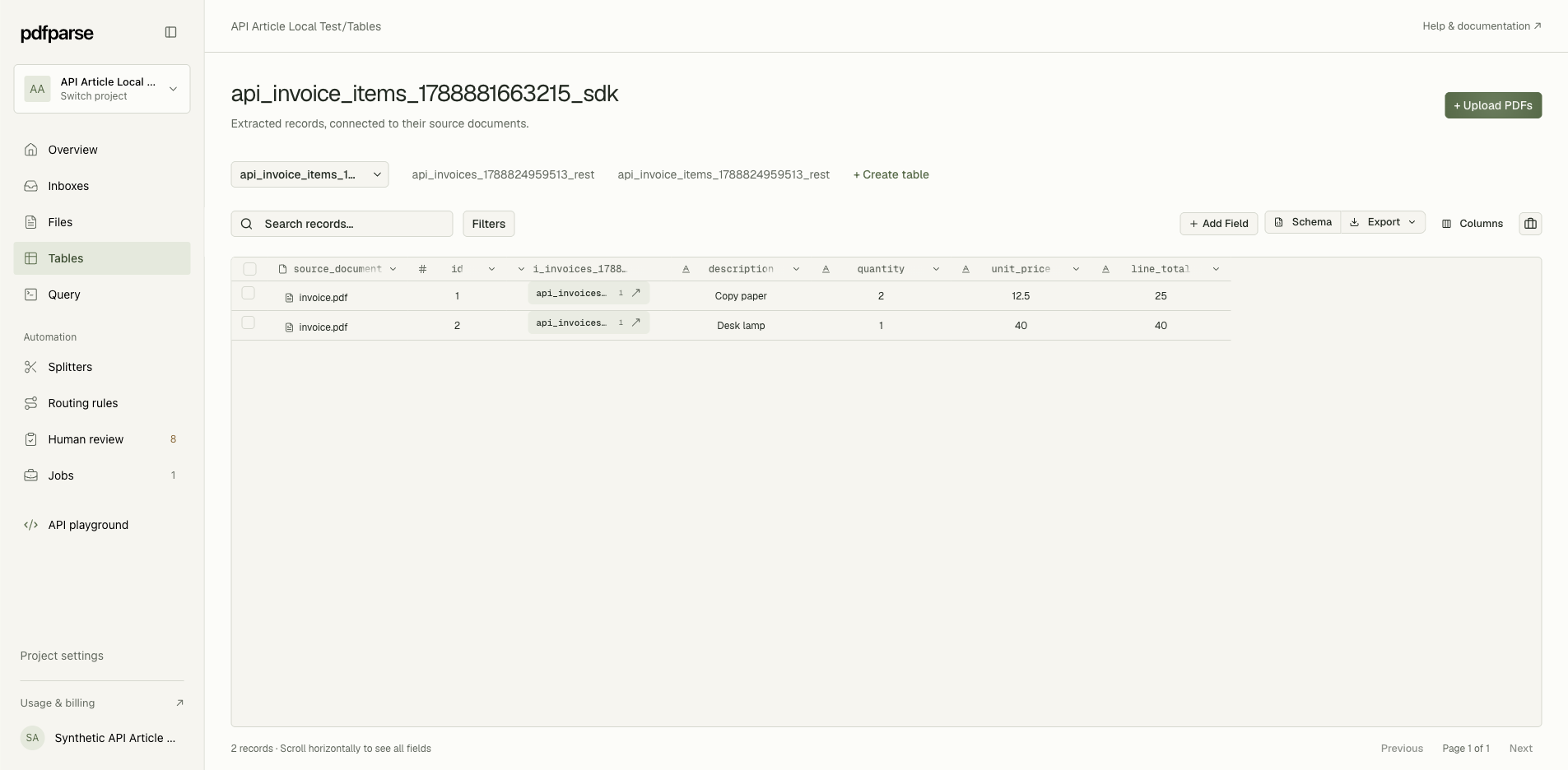
For our sample, the business fields in the invoice record should match the table above. The child records should contain:
| Description | Quantity | Unit price, USD | Line total, USD |
|---|---|---|---|
| Copy paper | 2 | 12.50 | 25.00 |
| Desk lamp | 1 | 40.00 | 40.00 |
Check both the values and the relationships. Two correct items attached to the wrong invoice would still be an incorrect result. Generated identifiers and source-document links are system fields; you do not need to ask the model to invent them.
Then reconcile the amounts:
- Line totals: 25.00 + 40.00 = 65.00, matching the subtotal.
- Subtotal plus tax: 65.00 + 5.20 = 70.20, matching the invoice total.
- Item count: two rows, matching the two purchased items in the PDF.
These are checks you perform on the result, not a claim that PdfParse automatically enforces your accounting rules. Real invoices can include discounts, shipping, deposits, rounding, and multiple tax rates. Adjust your fields and checks to those documents.
If a value is wrong, inspect the source and the field's extraction instruction. Clarify an ambiguous instruction before retrying. For failed extraction or routing that needs attention, use the project's Human review area. An unclear scan or missing source value may require manual review rather than another attempt with the same inputs.
Choose SQLite, JSON, or CSV for the next step
PdfParse supports three output formats. Pick one based on how you will use the reviewed data.
| Format | Use it when | What to check |
|---|---|---|
| CSV | You need a flat table for a spreadsheet or an import. | Verify column names, date formats, and how the receiving tool handles identifiers and empty values. |
| JSON | An application needs structured records. | Confirm the expected fields and how related records are represented. |
| SQLite | You need tables and relationships in a portable database. | Confirm the relevant tables, row counts, and parent-child links are included. |
CSV is convenient for individual tables, but a flat file does not itself carry a database's relationships. Keep identifiers when exporting related tables separately. SQLite is useful when you want to retain a relational dataset for querying or analysis. The PDF-to-SQLite overview explains that output in more detail.
Use Export in the table workspace for the available table export actions. For project export artifacts, check Downloads. Open the downloaded result in your receiving tool and repeat the row-count and total checks before using it in a larger workflow.
Connect the same workflow to other systems
The dashboard is one way to work with PdfParse. REST API access, a TypeScript SDK, webhooks, and MCP tools are available for programmatic workflows and agents.
The underlying decisions remain the same: choose the project and schema, submit documents, wait for completion, review or validate the result, and retrieve the records. Automation does not remove the need to check missing values, unexpected item counts, or incorrect totals.
For implementation details, start with the API reference. For PDF attachments arriving by email, read Introducing Email Inboxes. These are optional paths after you have established a useful table structure with a representative document.
What to expect before you rely on the output
PdfParse supports digital and scanned PDFs, but source quality and schema design affect what can be extracted. Test representative documents, including the less convenient cases, before treating a successful sample as evidence that the whole batch will work.
Review small text, ambiguous dates, multi-page item lists, and documents that differ from your initial sample. Keep missing values distinct from zero or an empty string when that distinction matters to the receiving system. If a document contains several record types, decide how to route or split it before assuming every page belongs in one table.
Use current pricing to check plan allowances and terms. This article does not freeze a price table or promise a particular per-document cost. Evaluate the workflow using documents and outputs that reflect your own requirements.
Your first useful result
For the sample invoice, success means one invoice record, two related item records, a link back to the source PDF, and totals that reconcile to USD 70.20. You can then export the records in the format your next tool needs.
Repeat those checks on a few different layouts before expanding to a batch. The next step is the first-project tutorial, which walks through creating a project and extracting your own document.