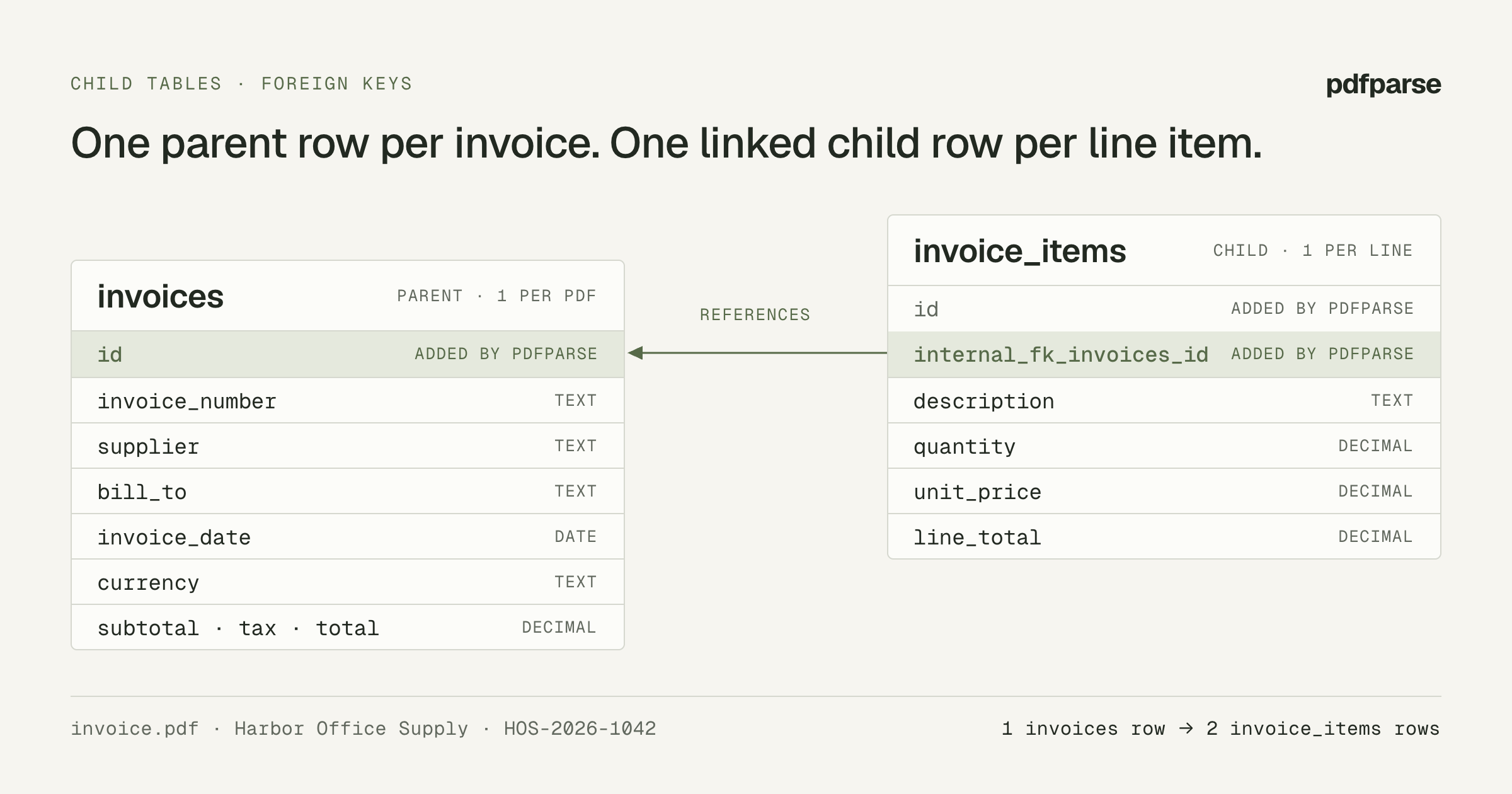
An invoice has one header and many line items. Flatten it into one row and you either repeat the header on every line or pack the lines into a JSON string your database cannot filter. PdfParse solves this with child tables: one parent row per document, plus one child row per repeating item, each linked back to its parent by a generated foreign key.
This tutorial builds that schema for a single synthetic invoice, runs an
extraction, and checks that every line item points at the right invoice. The
dashboard path needs no code. The API path is marked Advanced and uses the
public pdfparse-sdk package.
The invoice used in this tutorial
Download the synthetic invoice PDF. The same
file ships inside pdfparse-sdk as examples/invoice.pdf. It contains:
| Field | Printed value |
|---|---|
| Supplier | Harbor Office Supply |
| Invoice number | HOS-2026-1042 |
| Invoice date | 2026-09-01 |
| Bill to | Cedar Demo Studio |
| Currency | USD |
| Line 1 | Copy paper, quantity 2, unit price 12.50, amount 25.00 |
| Line 2 | Desk lamp, quantity 1, unit price 40.00, amount 40.00 |
| Subtotal / tax / total | 65.00 / 5.20 / 70.20 |
Decide what goes in the parent and the child table
Put a field on the parent table when it appears once per invoice. Create a child table only for records that repeat.
| Table | Role | Your columns | Added by PdfParse |
|---|---|---|---|
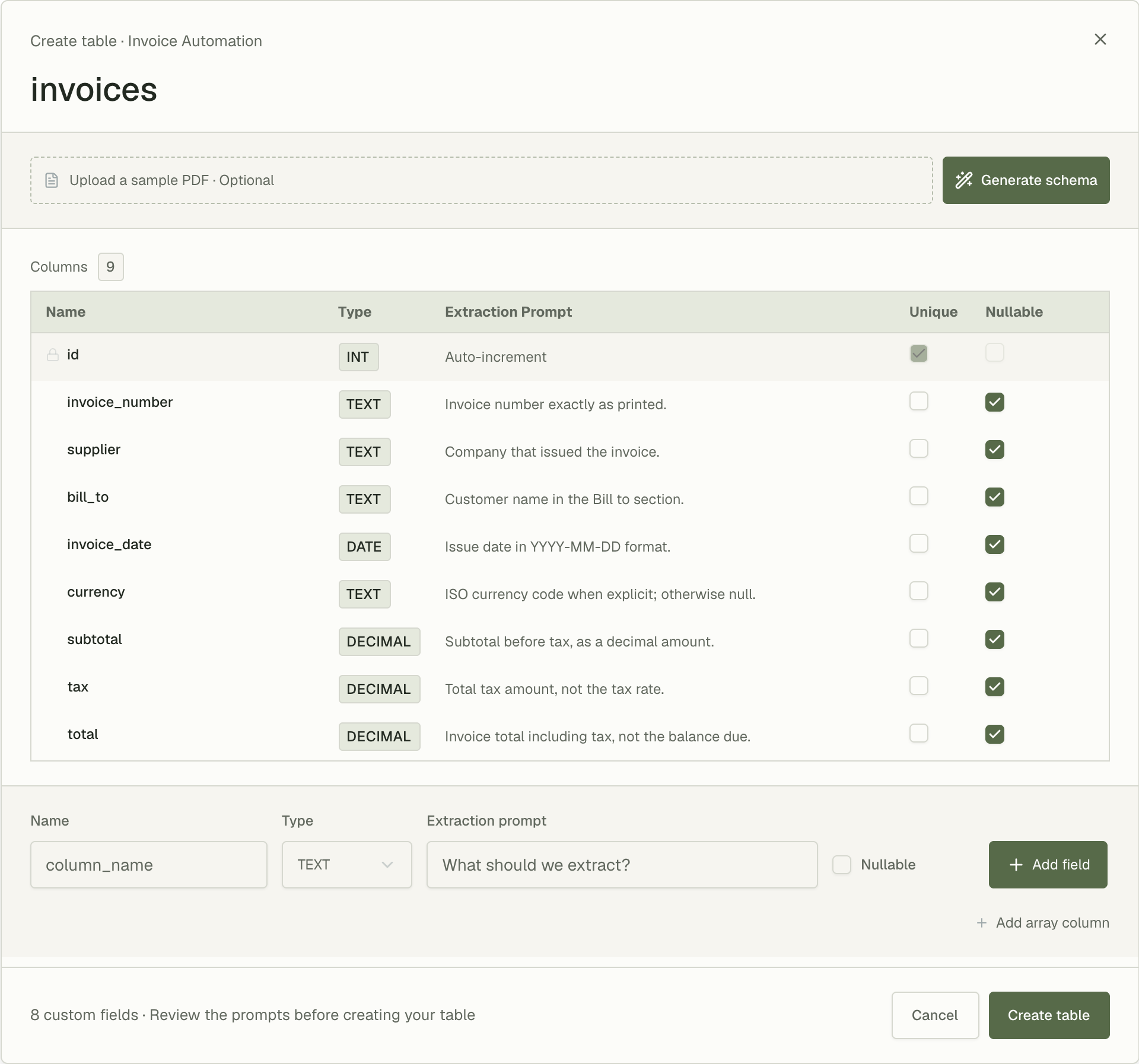
invoices | Parent, one row per PDF | invoice_number, supplier, bill_to, invoice_date, currency, subtotal, tax, total | id |
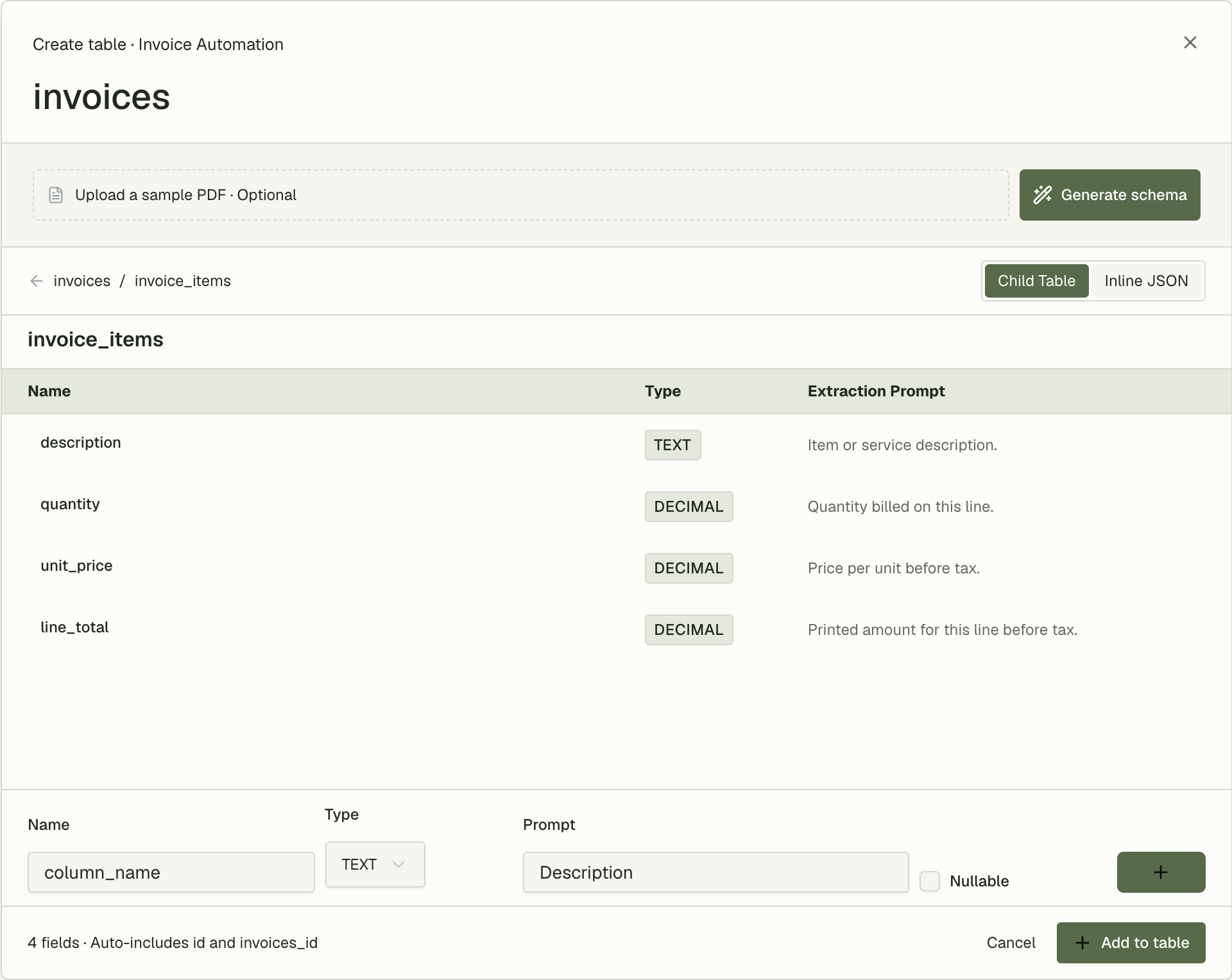
invoice_items | Child, one row per line item | description, quantity, unit_price, line_total | id, internal_fk_invoices_id |
This table is the conceptual model, not a request you can send. The exact API payload appears in Create the same tables with the API.
Three rules follow from how PdfParse creates tables:
- Do not add an
idor parent-reference column yourself. PdfParse adds an auto-incrementingidto both tables, and addsinternal_fk_invoices_idto the child table. The child-table editor shows it asinvoices_id; in SQL, API rows, and exports the column is namedinternal_fk_invoices_id. - Keep one-per-invoice values on the parent. The bill-to customer appears
once, so it is a parent column. A
customerchild table would always hold exactly one row and add a join without adding information. - Make extracted columns nullable unless every document is guaranteed to contain the value. A non-nullable column rejects a row when the value is missing from the PDF.
Create the tables in the dashboard
- Open your project, select Tables, then + Create table.
- Name the table
invoices. - Add each parent column from the table above. For each one, enter a Name,
choose a Type, write a Prompt, and tick Nullable. Use
TEXTforinvoice_number,supplier,bill_to, andcurrency;DATEforinvoice_date; andDECIMALforsubtotal,tax, andtotal. - Select Add array column and keep Child Table selected.
- Name the child table
invoice_items. - Add
description(TEXT), thenquantity,unit_price, andline_total(allDECIMAL), each with a prompt and nullable. Select Add to table. - Select Create Table.
Expected result: invoices and invoice_items both appear in the project's
table list. Open invoice_items: alongside your four columns it has an id and
the parent-reference column.
If creation fails because a table with that name already exists, rename the new
pair (for example invoices_v2 and invoice_items_v2) or use a fresh project.
Child table names must be unique within the project, too.
Extract the sample invoice
- Open the
invoicestable and select Upload PDFs. - Add
invoice.pdf, wait until it shows as uploaded, then select Confirm. - Open Files. Uploads go through the project's routing rules, and this
project has none yet, so
invoice.pdfshows as Needs review. - Select Review, choose
invoicesas the Destination table, then select Route and start extraction. - Wait for the file's status to change to Completed.
Route the PDF to the parent table. PdfParse extracts the parent row and its
child rows from the same document in one pass. Do not choose invoice_items,
even though it appears in the destination list. To skip the review step for
future invoices, add a routing rule for invoices.
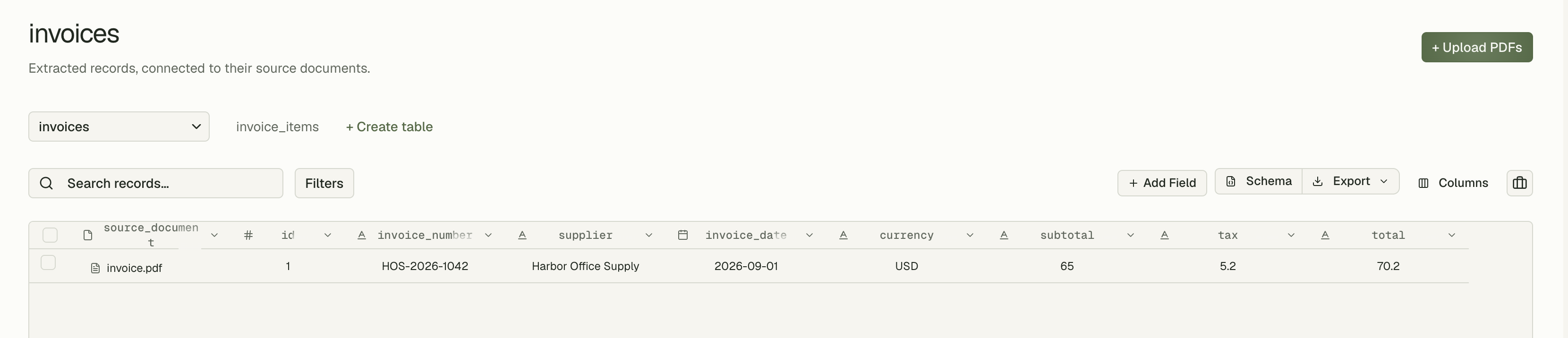
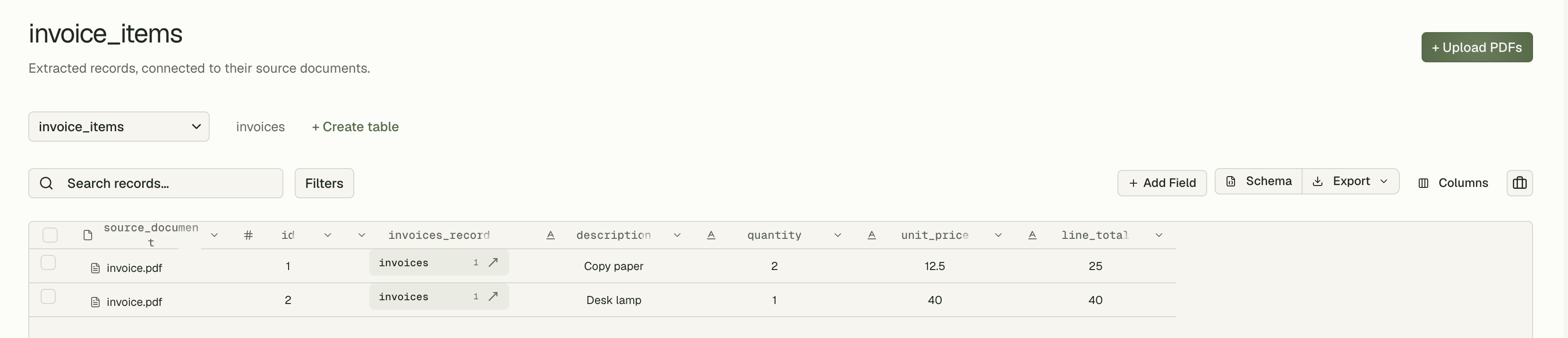
Expected result: invoices has one new row and invoice_items has two:
invoice_number | subtotal | tax | total |
|---|---|---|---|
| HOS-2026-1042 | 65 | 5.2 | 70.2 |
description | quantity | unit_price | line_total |
|---|---|---|---|
| Copy paper | 2 | 12.5 | 25 |
| Desk lamp | 1 | 40 | 40 |
These are the values printed on the PDF, which is what a correct extraction
should return. They are not a recorded API response. Real rows also include
generated IDs, the source document_record_id, and timestamps.
If the document fails, it appears under Human review with the error. Fix the cause, usually a vague prompt or a non-nullable column, before you retry.
Check that each line item points at its invoice
Open Query in the project sidebar, paste this statement, and select Run:
Expected result: two rows, both with invoice_number HOS-2026-1042.
Then confirm that no line item lost its parent and that the lines add up to the subtotal:
Expected result: subtotal and sum_of_lines are both 65, and
orphaned_items is 0. If the sums differ, look for a line that wraps onto two
rows in the PDF, or a discount or freight line. Tighten the invoice_items
column prompts rather than editing the totals.
The parent link is a column populated by PdfParse during extraction, not a
SQLite REFERENCES constraint. Run the orphan check above after importing data
into another system.
Create the same tables with the API
This section requires Node.js 20 or later, a project API key from the project's API Keys page, and available processing quota. Keep the key on your server.
POST /v1/tables creates the parent and its child tables in one request. This
is the complete request body, matching the dashboard schema above:
The request shape is strict about a few names:
- Tables use
nameandcolumns; child tables go in a top-levelchildTablesarray. There is nofields,key,parent, orrepeatingproperty. typeis one oftext,number,date, orboolean.stringis rejected. The API'snumbercorresponds to the dashboard'sDECIMAL.- Leave out
idandinternal_fk_invoices_id. PdfParse adds both.
The response is 201 with the parent's { "id", "slug" }. A name that already
exists in the project returns 409 conflict.
Run the extraction from Node.js
Install the SDK, copy the sample invoice, and save your key in .env:
Save the request body above as invoice-schema.json, then save this script as
extract-invoice-items.mjs. It reuses the invoices tables if they already
exist, uploads the PDF to the parent table, waits for the job, and reads the
linked rows with SQL.
Run it:
Expected output: a job ID, a two-row table for Copy paper and Desk lamp that
share one invoice_id, and
2 line items linked to invoice HOS-2026-1042.
Each run uploads and extracts the PDF again, which uses quota. If the script
stops while waiting, check the job in the dashboard's Jobs page instead of
rerunning it. For a resumable version with saved IDs and CSV export, follow the
tutorial in the pdfparse-sdk README.
To read child rows without SQL, call client.rows.search with the child table's
id from client.tables.list() and filter on
{ column: "document_record_id", op: "eq", value: fileId }. Parent-row responses
do not embed their child rows.
Export the linked tables
- One table: open the table, select Export, and choose Export as CSV
or Export as JSON. Export
both
invoicesandinvoice_items, and keepidandinternal_fk_invoices_idso the files can be joined again. - The whole project: open Project settings → Data & export and select Export SQLite Database. The export runs in the background, and PdfParse emails you when the file is ready. Run the orphan check above against the downloaded file before loading it elsewhere.
Next step
You now have an invoice schema whose line items are real rows, linked to their
invoice by internal_fk_invoices_id, and two queries that prove the link and the
arithmetic. Run five to ten invoices from different suppliers through the same
tables and repeat the reconciliation query before automating the workflow.
For when a child table is the wrong choice, read JSON arrays vs child tables. For the same pattern applied to statements and transactions, see Extract Transactions From a PDF Bank Statement. Questions about a more complex invoice schema can go to support@pdfparse.net.