A PDF bank statement may look like a tidy ledger, but extracting it reliably is more than copying visible text. Wrapped descriptions must stay with the correct transaction, dates need a consistent year, and a missing decimal point or reversed debit can change the closing balance.
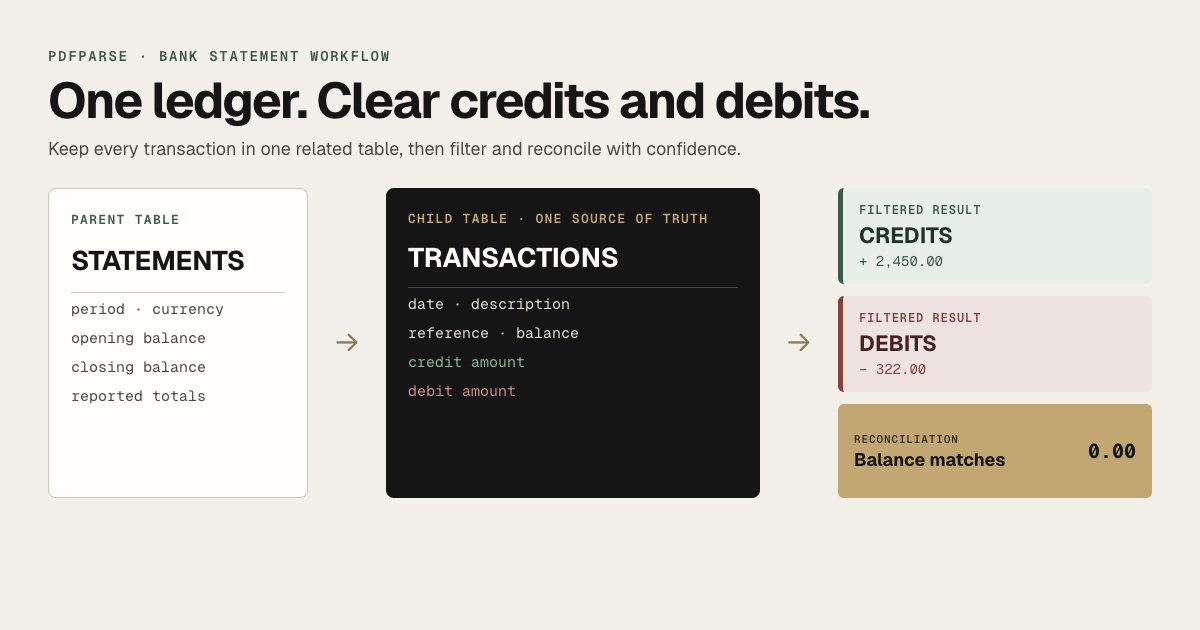
This walkthrough turns one synthetic June 2026 statement into two related tables in PdfParse: one statements row for the account period and one transactions row for every ledger entry. Credits and debits remain separate columns in the transaction table, so the complete chronology has one source of truth.
By the end, you will have a reviewed transaction ledger, credit-only and debit-only query results, and a reconciliation result of 0.00 before exporting the data as CSV, JSON, or SQLite.
What the finished bank statement dataset contains
The parent statements table stores values that appear once for the document:
| bank_name | account_number_masked | period_start | period_end | opening_balance | closing_balance | currency |
|---|---|---|---|---|---|---|
| Example Bank | ****1842 | 2026-06-01 | 2026-06-30 | 2870.18 | 4998.18 | JMD |
The related transactions table stores the repeating ledger entries:
| transaction_date | description | reference | debit | credit | running_balance |
|---|---|---|---|---|---|
| 2026-06-02 | Payroll deposit | PAY-0602 | 2450.00 | 5320.18 | |
| 2026-06-03 | Office supply store | POS-1842 | 297.00 | 5023.18 | |
| 2026-06-04 | Monthly account fee | FEE-0604 | 25.00 | 4998.18 |
Each transaction has either a debit or a credit. Keeping both kinds of entries in one table preserves their order and prevents the same transaction from being stored twice. Credit-only and debit-only tables will be produced later as filtered query results.
Use synthetic or authorized statements when following this tutorial. Do not upload bank documents you do not have permission to process.
Create the statement and transaction schema
Start with one representative statement that includes the layouts and transaction types you expect to process. A difficult sample with wrapped descriptions, page breaks, or separate debit and credit columns is more useful than an unusually clean statement.
In a PdfParse project:
- Select New table.
- Add the sample statement to Smart Extractor.
- Enter this instruction:
Create one statements row with the bank name, masked account number, statement period, opening balance, closing balance, reported total credits, reported total debits, and currency. Put every repeating ledger entry in a transactions child table with transaction date, posting date, complete description, reference, debit, credit, and running balance. Use positive values in the debit and credit columns. Populate only the applicable amount column for each transaction.
- Select Generate schema.
- Review every field, type, prompt, and relationship before selecting Create Table.
Expected result: the project sidebar lists statements and transactions. PdfParse automatically adds the record IDs and the relationship from every transaction to its statement; do not ask the extraction model to invent those values.
If the generated result puts transactions in a JSON field or creates separate physical credit and debit tables, revise the instruction and regenerate. The intended model is one statement table plus one complete transaction ledger.
Verify the fields before processing
The statements table should contain these business fields:
| Field | Type | What it captures |
|---|---|---|
bank_name | text | Bank or financial institution printed on the statement |
account_number_masked | text | Only the masked account identifier needed for review |
period_start | date | First date covered by the statement |
period_end | date | Last date covered by the statement |
opening_balance | number | Balance before the period's transactions |
closing_balance | number | Balance after the period's transactions |
reported_total_credits | number | Credit total printed by the bank, when present |
reported_total_debits | number | Debit total printed by the bank, when present |
currency | text | Statement currency such as JMD, USD, or EUR |
The transactions child table should contain:
| Field | Type | What it captures |
|---|---|---|
transaction_date | date | Date the transaction occurred |
posting_date | date | Date it posted, when the statement provides one |
description | text | All description lines belonging to the transaction |
reference | text | Printed reference, cheque number, or trace identifier |
debit | number | Positive money-out value; otherwise empty |
credit | number | Positive money-in value; otherwise empty |
running_balance | number | Balance printed after the transaction |
Confirm that dates use date fields and monetary values use numeric fields. Keep the full account number out of prompts, screenshots, and exports unless a downstream process genuinely requires it.
Extract one representative statement
With the schema saved:
- Open
statementsand select Manage Files. - Upload the representative statement.
- Select the queued file and choose Process Selected.
- Wait for the job to finish.
- Open both
statementsandtransactionsto confirm that rows were created.
Expected result for the tutorial example: one statement row and three related transaction rows. If the statement row appears but the transaction table is empty, return to the schema and confirm that transactions is a child table with prompts describing repeating ledger entries.
Review the transaction ledger against the PDF
Open the source-document control from an extracted row and compare the ledger with the original statement. Review more than the first page or first few entries.
Check these failure-prone details:
- Wrapped descriptions: continuation text belongs to the preceding transaction, not a new row.
- Repeated headers: a header repeated on page two must not become a transaction.
- Debit and credit direction: each row should populate one amount column, not both.
- Missing years: infer the year from the statement period, including periods that cross December and January.
- OCR-sensitive characters: inspect decimal points, minus signs,
0versusO, andDRorCRmarkers on scanned statements. - Page boundaries: compare the last running balance on one page with the first transaction on the next.
Correct the schema prompt and reprocess the representative file when the same mistake affects several rows. Correct an individual row only when the schema is sound and the problem is isolated.
Separate credits and debits with SQL
This optional section uses the read-only SQL workspace. It assumes the parent table is named statements, the child table is named transactions, and PdfParse created internal_fk_statements_id as the relationship column.
Run this query to produce the credit-only result:
Expected result:
| transaction_date | description | reference | credit | running_balance |
|---|---|---|---|---|
| 2026-06-02 | Payroll deposit | PAY-0602 | 2450.00 | 5320.18 |
Run the equivalent debit query:
Expected result:
| transaction_date | description | reference | debit | running_balance |
|---|---|---|---|---|
| 2026-06-03 | Office supply store | POS-1842 | 297.00 | 5023.18 |
| 2026-06-04 | Monthly account fee | FEE-0604 | 25.00 | 4998.18 |
These are query results, not additional stored copies of the transactions. Any correction made to the ledger automatically appears the next time either query runs.
Reconcile the calculated and reported balances
For statements with positive debit and credit columns, the basic reconciliation rule is:
Run this query in the SQL workspace:
Expected result for the example:
| statement_id | opening_balance | total_credits | total_debits | closing_balance | difference |
|---|---|---|---|---|---|
| 1 | 2870.18 | 2450.00 | 322.00 | 4998.18 | 0.00 |
A difference of 0.00 confirms that the extracted values satisfy the balance equation; it does not prove every description or date is correct. Complete the source review as well.
If the result does not reconcile, look for a missing page, duplicated row, reversed debit or credit, OCR error, fee outside the main ledger, or a statement that uses a different balance convention. Never edit a value merely to force the difference to zero.
Export the reviewed bank statement data
After the rows and reconciliation result have been checked:
- Open
statementsortransactions. - Select Export.
- Choose Export as CSV for spreadsheets and accounting imports, or Export as JSON for another application.
- Repeat the export from the other table so the statement and its transaction rows travel together.
For a complete portable database, use SQLite Database Export in Project Settings. The SQLite file preserves both tables and their relationship, making it the best choice when the next step uses SQL or combines many statements.
Before handing off an export, verify that it contains one statement row, three transaction rows, total credits of 2450.00, total debits of 322.00, and a closing balance of 4998.18 for this example.
Common bank statement extraction questions
Should debits be stored as negative numbers?
This tutorial stores positive values in separate debit and credit columns because that matches many bank statements and makes the reconciliation formula explicit. If your source uses one signed amount column, choose that convention instead and use it consistently across the schema, queries, and exports.
Why not create separate credit and debit tables?
Credits and debits share the same dates, descriptions, references, and running-balance fields. Keeping them in one transaction table preserves the full ledger order and avoids storing the same financial event in more than one place. Filtered queries still provide separate credit and debit results whenever they are needed.
How is this different from parsing a credit card statement?
A deposit-account statement is reconciled from an opening balance, credits, and debits. Credit-card statements also contain concepts such as payments, purchases, fees, interest, minimum payment, and payment due date. For that workflow, follow the credit-card statement tutorial.
Can scanned statements use the same schema?
Yes, but inspect recognition-sensitive values more closely. Small text, skew, faint decimal points, and DR or CR markers create additional opportunities for OCR errors.
Build and verify your own transaction ledger
The completed dataset has one statement row, one related row for every transaction, filtered credit and debit results, and a reconciliation difference of 0.00. Its main limitation is that banks use different sign and balance conventions, so validate the schema against a representative sample before processing a batch.
Start with the bank statement parser and one authorized statement. For adjacent decisions, compare CSV, JSON, and SQLite outputs or learn when to use JSON arrays instead of child tables.