In document extraction, splitters are workflows that separate documents into logically grouped pages. These pages are then extracted to be used further down in the pipeline. Logical splitters enable flexibility and more dynamic solutions than extracting an entire PDF through one nested schema, which is the original architecture PdfParse settled on. This limitation significantly reduced our capability to expand our product offerings and to offer automation for compound documents, so we redesigned it. This article is a top-level engineering article where we explain the original pipeline, our new architecture, and what drove the decisions we made.
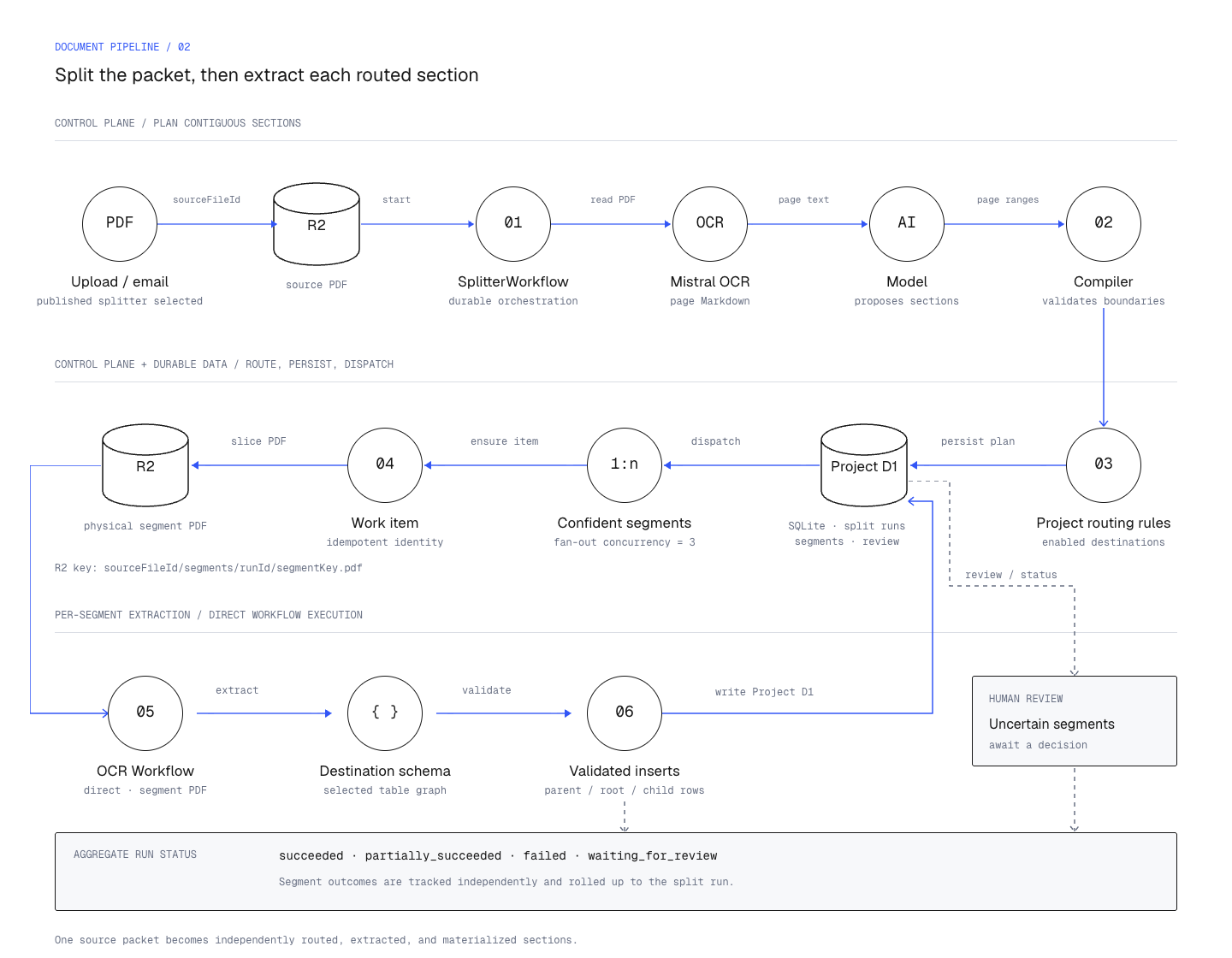
We still use schemas to define the extracted data. What we changed is the association between the entire PDF and one extraction. A PDF can now have several sections, with each section routed and extracted separately.
The old architecture.
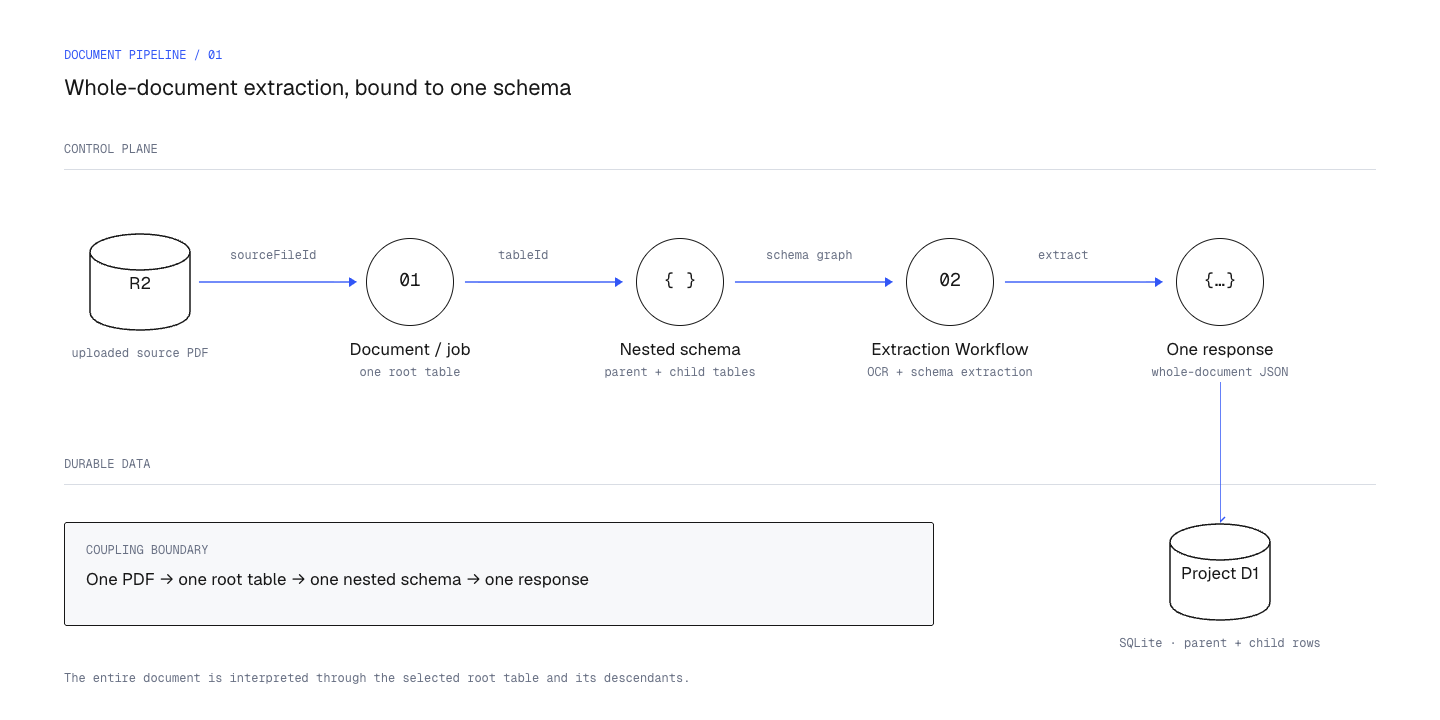
Previously, PdfParse used predefined nested user schemas to help us decide how a document should be extracted. This design worked well for a v1; users could easily build relational data from a single PDF. However, this posed several problems. One of them was that uploaded PDFs would always be tied to a specific root table—the current table in view for a direct upload. This strict association made it difficult to reason about how we could expand a line_items table to accept several independently processed item sections from the same PDF.
For example, a user could create an invoices table with a related line_items table. PdfParse would create a nested representation of that data, extract it in one response, and save the invoice with its items. This also worked with differently structured PDFs. Multiple source documents could already feed the same table.
What made the design restrictive was that the source document, root table, nested response, and persistence lifecycle were all tied together. The relationship between tables also decided which data we had to extract and save together.
We wanted users to be able to have multiple different sections of a source document normalized to the same table, with a way for them to trace the source. We already provided source tracing through UI feedback. Users can see which document is responsible for the extracted data. What we did not provide, as mentioned before, was a way for users to have these sections processed independently, whether they belonged in the same table or in different tables. Logical splitters were the most obvious solution to implement.
What happens when one PDF contains several documents?
To explain this, we can use a fictional supplier called Meridian. They send us a ten-page PDF with two purchase orders, their item schedules, a delivery schedule, and shared terms:
| Pages | Contents | Intended treatment |
|---|---|---|
| 1–2 | Purchase order M-1042 | Extract an order record |
| 3–4 | Item schedule for M-1042 | Extract items linked to M-1042 |
| 5–6 | Purchase order M-1043 | Extract a second order record |
| 7–8 | Item schedule for M-1043 | Extract items linked to M-1043 |
| 9 | Delivery schedule referencing both orders | Process as a separate section |
| 10 | Shared terms | Review and explicitly decide whether extraction is needed |
Both purchase orders would need to be saved to the same table. The same would apply to the item schedules. However, if we only used the source PDF and destination table to identify the extraction, we would have no reliable way to distinguish the first section from the second. A check to prevent duplicate work could cause us to skip the second section.
We would also need to save data to several different tables. Making everything a child of the first purchase order would give us the wrong relationships. The shared terms belong to the packet, but they are not necessarily a child record of M-1042.
Another problem would be retries. If both orders were extracted correctly but the delivery schedule failed, we would want to retry page 9. Running the whole PDF again would add work and could change data that had already been extracted correctly.
We wanted each section to have its own destination and a way to retry it, while still keeping it connected to the original PDF. To do this, we needed to save the sections themselves.
New architecture: Intelligent document splitting.
The new architecture introduces a splitter workflow. Users get a control plane where they can upload documents and have the AI propose logical sections for review. The architecture also supports configured page ranges where the sections are already known. These spans are then saved to a database, which we use later in our extraction pipeline to manage document splitting.
We record a splitter run and the segments it produces. Each segment has its own ID and page spans pointing back to the source PDF. The run also records which splitter version we used.
We can represent this with a segment and a work item. This is a simplified TypeScript example, with the pages kept relative to the original PDF. The examples below illustrate the design rather than our production source. You'll need a durable database and a job runner, with authentication, storage, transactions, and queue delivery connected in your own application.
Meridian's orders get different segment IDs and share a tableId. Keep those values stable when retrying. For a deliberate reanalysis, create a new run or revision and decide which earlier results it replaces.
For logical splitting, we read the page text and ask the model to group consecutive pages into sections. We validate the result before saving it. Users can configure the section types, or the model can discover them when none are configured.
Using Meridian as an example, both purchase orders would be saved as separate segments. They would use the same schema, but we could process them independently.
We also save the confidence and review state with the pages. This gives us a way to flag sections where we are unsure about the split. Users need to be able to review these sections before we send the wrong pages to extraction.
Keeping the splitter version allows us to see which instructions were responsible for the result. Users can change their configuration later, but we still need to know what was used for an earlier extraction.
Use routing rules to choose the table
After the pages are grouped, we use routing rules to decide which table should receive each section.
The logical workflow checks each section against the project's enabled rules. It uses the section text, applies the configured confidence thresholds, and saves either a destination or a request for review. If no rule gives us an acceptable route, we keep the section available for review.
For routing, let the model suggest a rule and check it against your saved configuration. This simplified TypeScript example routes only when exactly one known rule meets its threshold. Anything else goes to review:
Load only the current project's authorized rules. Validate their IDs and thresholds when saving the configuration. Your code chooses the table from the accepted rule. Test a single match, two matches, an unknown rule, and an invalid score. Only the single valid match should route.
In our example, we would route both orders to purchase_orders and both item schedules to line_items. The delivery schedule can go to its own table. We still need to decide what to do with shared terms; uploading a page doesn't necessarily mean we want a row from it.
Once the split and route are accepted, we create a PDF containing that segment's pages and send it to extraction. The destination schema tells the model what to extract, just as it did before.
We track this work by its run, segment, destination, and schema/configuration revision reference. That gives a repeated dispatch a way to find the existing work. We also retain the original page references, so page 1 of a generated segment PDF can still point back to page 5 of Meridian's upload.
The database has to handle sections too
Processing sections separately also changes how we save the extracted data. We still need to make sure that the rows are saved correctly and that their relationships are preserved.
One problem would be that an item schedule could finish before the purchase order it belongs to. Previously, the parent and its children arrived in the same response. We now need a way to wait for the order and match the items using an explicit key, such as M-1042. If the order is missing or there is more than one possible match, we need to flag it for review.
Retries need the same care. Retrying page 9 should leave the accepted order rows alone. Keeping dispatch from creating duplicate jobs helps, but the database writes need to be safe to repeat too. We need to know when to reuse an existing result and when a new result replaces it.
In this simplified TypeScript example, we use those fields to build an idempotency key—a key that stays the same when we repeat the same work. This uses Web Crypto. Encoding an array avoids collisions caused by joining strings without clear separators:
Make the key unique in the database and claim the work atomically before dispatch. You'll also need a uniqueness or replacement rule when saving the extracted rows. The key doesn't prevent duplicate writes by itself. A useful check: retrying keeps the key unchanged; changing the segment changes it.
The source tracing we already provided also needs to include the section and its pages. Users should be able to see which routing decision and configuration were responsible for the extracted row. This would let them review the relevant pages without searching through the whole PDF.
That source history also matters when we delete or reanalyze a document. The old cleanup path could start from one root table and follow its children. A split packet can produce rows across several tables, so cleanup needs to find all of them. It also needs to stop active extraction work from writing those rows back after deletion.
If a user changes one segment and runs it again, we need to replace the affected rows without disturbing the others. An older attempt still running in the background must not overwrite the corrected result when it finishes.
A few other assumptions had to change
One PDF no longer gives us one simple completed-or-failed result. Meridian's orders might be ready while the delivery schedule has failed and the terms need review. We track individual work states and can represent partial success and review at the run level. Downstream integrations need to know which results they can use.
We also need to finish planning the work before marking the run complete. This simplified TypeScript example waits for the splitter to finish finding sections:
This example includes relationship waits as well as extraction jobs. Give those waits a timeout that ends in review or failure, and decide how your product handles a packet with nothing to extract. Read and save the overall state consistently, using a transaction or equivalent concurrency control.
For Meridian, successful orders and a failed delivery section should give us partial success once the other jobs and reviews are settled. That's more useful than marking the whole PDF as failed.
Schema versions matter for the same reason. If a user changes line_items halfway through a run, we need to know which definition each extraction used. We store a revision reference, and the extraction and validation paths need to use the corresponding snapshot consistently.
We still need to normalize values. Splitting won't make dates consistent or preserve leading zeros in an order number automatically. Both direct extraction and segment extraction need the same conversion rules before they write to the table. Otherwise we can split every page correctly and still fail to match an item to its order.
We also have to account for the extra processing. We read the source to find sections, route those sections, and extract their pages. Retries or shared pages can add more work than the original page count suggests. We need to meter that work separately and make the billing policy clear.
Finally, one upload can now create many jobs. Our routing and dispatch loops limit concurrent work within a run. We also need project limits, maximum segment counts, and retry budgets to keep larger uploads predictable. Limiting one run doesn't tell us what happens when a project starts a hundred of them.
Verifying the extraction.
Using the Meridian example, we would expect two orders with their items attached correctly, and a delivery schedule that can be processed separately. Users should be able to trace every row back to the correct source pages.
The next step is to run this packet through the full pipeline and verify the extracted rows. We also need to retry the delivery section and check that the orders stay unchanged. The same checks should cover duplicate dispatch, items finishing before their parent, and sections that have been changed and extracted again.
These checks would show whether the sections can be processed independently without losing the relationships between the extracted data. This is what we wanted to support with logical splitters. The original pipeline worked well for one logical document, and the new architecture gives us a way to apply the same schemas to sections of a larger PDF.