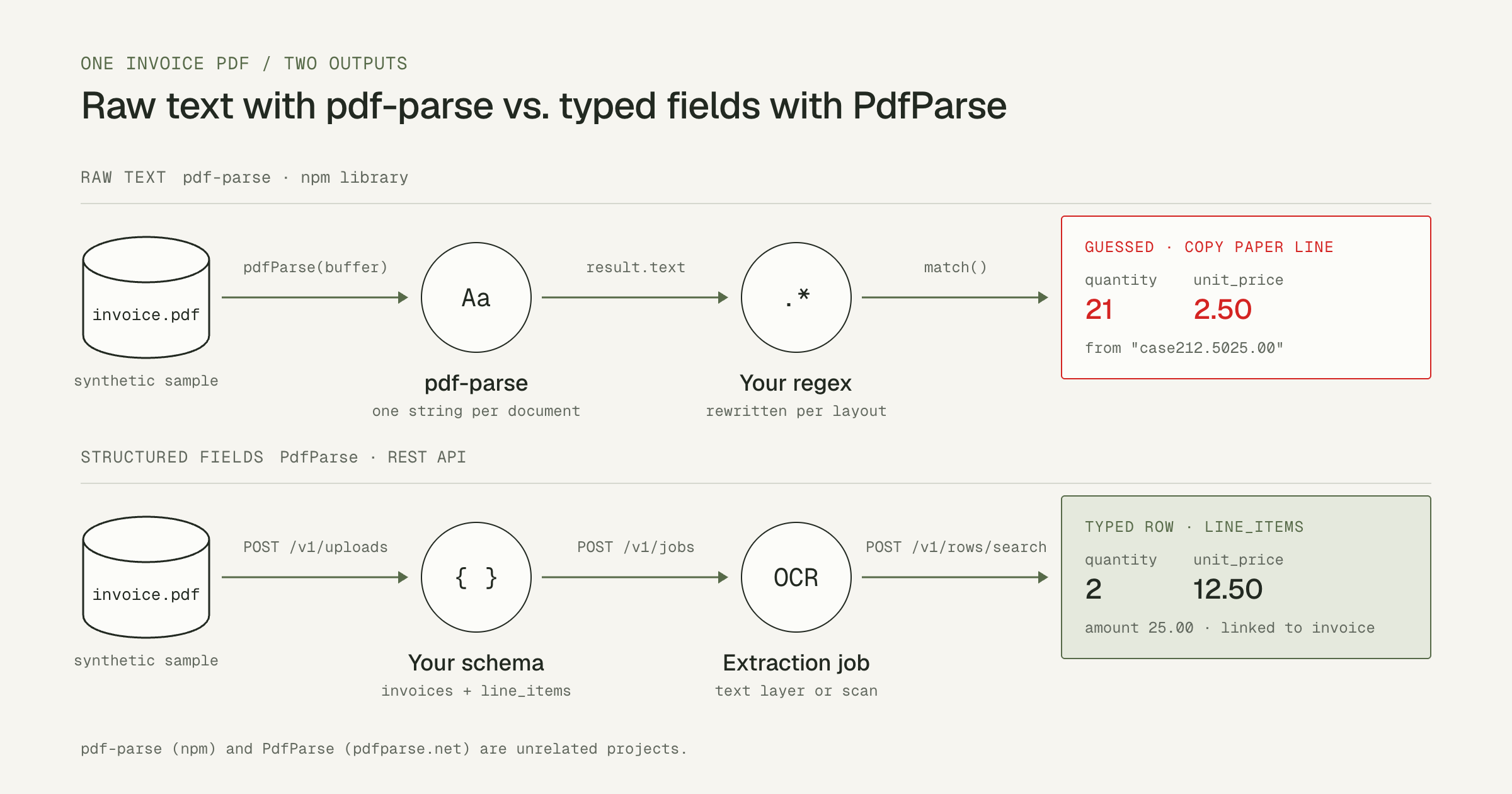
You installed pdf-parse because you need data out of PDFs in a Node.js
service: an invoice number, a total, the line items. Getting the text out takes
three lines. Turning that text into reliable fields is the hard part. Columns run
together, every vendor uses different labels, and scanned pages return no text
at all.
This guide shows correct pdf-parse usage for both the 1.x and 2.x APIs, runs
it on three sample PDFs, and shows exactly where regex parsing breaks. It then
shows the next step: defining the fields you want and getting them back as typed
JSON rows from the PdfParse REST API.
pdf-parse and PdfParse are unrelated. pdf-parse is an open-source npm
library maintained on GitHub. PdfParse (pdfparse.net, the publisher of this
blog) is a separate hosted extraction product. PdfParse does not maintain,
fork, or depend on the npm package.
TL;DR
npm install pdf-parsenow installs version 2.x, which usesnew PDFParse({ data })andgetText(). ThepdfParse(buffer)function API is version 1.x.- Version 1.x resolves to
{ numpages, numrender, info, metadata, text, version }. In 2.x, the page count istotaland document info comes fromgetInfo(). - Neither version performs OCR. An image-only scan returns an empty string.
- On our sample invoice, 1.x joined the table cells into
case212.5025.00, and a reasonable regex read the quantity as 21 instead of 2. - When you need typed fields across vendor layouts and scans, define a schema
and extract against it, for example with
POST /v1/jobsin the PdfParse API.
Download the sample PDFs
Every output in this article comes from these three synthetic files. None contains real customer data.
- harbor-invoice.pdf: Harbor Office Supply invoice HOS-2026-1042 with a text layer.
- bayside-invoice.pdf: a bill from a second vendor with different labels, a European date, and comma decimals.
- harbor-invoice-scanned.pdf: the Harbor invoice as a page image with no text layer.
The Harbor invoice prints these values:
| Field | Printed value |
|---|---|
| Vendor | Harbor Office Supply |
| Invoice number | HOS-2026-1042 |
| Invoice date | 2026-09-01 |
| Copy paper, A4, 5-ream case | quantity 2, unit price 12.50, amount 25.00 |
| LED desk lamp | quantity 1, unit price 40.00, amount 40.00 |
| Subtotal / tax / total due | 65.00 / 5.20 / 70.20 USD |
Extract text with pdf-parse 1.x: pdfParse(buffer)
This is the API most tutorials and existing codebases use. It needs Node.js and a PDF on disk. Version 1.x bundles a 2017 build of Mozilla's pdf.js (1.10.100).
-
Pin the 1.x line. A bare
npm install pdf-parsenow installs 2.x, which does not export a callable function. -
Save this as
read-invoice.cjsnext toharbor-invoice.pdf: -
Run it with
node read-invoice.cjs.
Expected output:
The promise resolves to an object with six keys:
| Key | What it contains |
|---|---|
numpages | Number of pages in the document. |
numrender | Number of pages actually rendered (limited by the max option). |
info | The PDF info dictionary: Title, Author, Creator, Producer, CreationDate, and format flags such as PDFFormatVersion. |
metadata | XMP metadata, or null when the file has none. |
text | All page text in one string. Each page is prefixed with two newlines. |
version | The bundled pdf.js version, 1.10.100. |
Verify the result: numpages should be 1 and text should contain
HOS-2026-1042.
Fix ENOENT: './test/data/05-versions-space.pdf'
Version 1.1.1 contains a debug block in its index.js that runs whenever
module.parent is undefined. That happens when you import the package from
an ES module or a bundler, and the import then tries to read a test PDF that is
not installed:
Version 1.1.4 removes that block, so upgrading within 1.x fixes it. If you must stay on 1.1.1, import the library file directly:
One more limit of the old bundled pdf.js: in our tests, 1.1.1 rejected a valid,
compressed PDF generated by PDFKit with bad XRef entry, while 2.4.5 read the
same file. Always attach a .catch() handler so one malformed file fails
visibly instead of crashing the process with an unhandled rejection.
Extract text with pdf-parse 2.x: new PDFParse()
Version 2.x is a rewrite with a class-based API, ESM and CommonJS builds, and extra methods for screenshots, images, and ruled tables. Version 2.4.5 declares support for Node.js 20.16 or later on the 20.x line, and 22.3 or later.
-
Install the current release:
-
Save this as
read-invoice.mjs: -
Run it with
node read-invoice.mjs.
Expected output:
In CommonJS, use const { PDFParse } = require("pdf-parse");. Call
destroy() when you finish so the parser releases its document.
Moving from 1.x to 2.x:
| 1.x | 2.x |
|---|---|
pdfParse(buffer) | new PDFParse({ data: buffer }), then getText() |
result.numpages | (await parser.getText()).total or (await parser.getInfo()).total |
result.info | (await parser.getInfo()).info |
result.metadata | (await parser.getInfo()).metadata |
result.text | (await parser.getText()).text, with a -- N of M -- marker after each page |
Version 2.x also separates table cells with spaces, which is easier to work with than 1.x's joined cells. It still gives you one string to interpret.
Turn the text into invoice fields with regular expressions
With the text in hand, the usual next step is a set of regular expressions. This script uses pdf-parse 1.1.4 and runs one parser over all three sample PDFs:
Run it with
node parse-invoices.cjs harbor-invoice.pdf bayside-invoice.pdf harbor-invoice-scanned.pdf.
This is the actual output:
The header fields on the Harbor invoice are correct. Everything else is wrong, and nothing in the output says so.
Where raw text stops being enough
The regex is not careless. The text it receives no longer contains the information it needs.
Table cells lose their boundaries
The PDF draws 2, 12.50, and 25.00 in separate columns. Version 1.x
returned case212.5025.00. Splitting that string as 2 / 12.50 / 25.00 or as
21 / 2.50 / 25.00 is equally valid to a regex, and backtracking picked the second.
The lamp line became quantity 14 at a unit price of 0. Version 2.x's spacing
helps here, but descriptions that contain numbers, such as A4 and 5-ream in
this one, still leave the description boundary to guesswork. Version 2.x's
getTable() detects tables drawn with ruling lines. On this borderless invoice
it returned no tables.
Line items belong to an invoice
An invoice is one record with several child records. A flat string has no notion of which lines belong to which invoice, which page a table continues on, or which rows are subtotals. You have to rebuild that structure yourself, and reconcile it, before the data can go into a database.
Every vendor needs its own parser
The Bayside bill has the same kinds of fields: Bill No. instead of
Invoice number, 17 Sep 2026 instead of an ISO date, Amount payable instead
of Total due, and 150,48 with a comma decimal. Every pattern returned null.
Each new supplier layout means another set of patterns and another set of tests.
Scanned PDFs have no text layer
pdf-parse reads the text objects stored in a PDF. It does not run OCR. For the
image-only scan, 1.x returned "\n\n" and 2.x returned only its page marker.
To detect this case, check whether text.trim() is empty, or contains only the
2.x -- N of M -- markers, while the page count is above zero, and route those
files to an OCR step.
When pdf-parse is still the right tool
| Use pdf-parse when | Use schema-based extraction when |
|---|---|
| You need searchable text, previews, or embeddings. | You need typed fields such as dates, amounts, and quantities. |
| Documents come from one generator with a fixed layout. | Layouts vary by vendor, customer, or country. |
| Every PDF has a text layer. | Some files are scans or phone photos. |
| A wrong value is cheap to notice. | A wrong value flows into accounting, ERP, or analytics. |
Get typed invoice fields from the PdfParse REST API
PdfParse takes the same PDF and a schema that names the fields you want. It
reads both digital and scanned PDFs, and writes the results as rows in a parent
table and a child table linked by a generated key. This section uses five
endpoints from the
PdfParse OpenAPI contract: POST /v1/tables,
POST /v1/uploads, POST /v1/jobs, GET /v1/jobs/{job_id}, and
POST /v1/rows/search.
Before you start, you need:
- Node.js 22 or later. The script uses only built-in
fetch. - A PdfParse project and a project API key, stored in
PDFPARSE_API_KEY. Keep the key in server-side code and out of source control. - Extraction credits. Jobs are charged per page.
- A PDF of 8 MiB or less, such as
harbor-invoice.pdf.
The script does five things:
- Defines the schema.
POST /v1/tablescreates aninvoicestable and aninvoice_line_itemschild table. Column types aretext,number,date,boolean, orforeign_key. Eachprompttells the extractor what the column means. - Uploads the PDF with the TUS resumable-upload protocol: a
POSTthat declares the size and metadata, then aPATCHwith the bytes. SetroutingModetodirectalongsidetableSlug. Withoutdirect, the project's automatic routing takes the document andPOST /v1/jobsresponds with409. - Starts the job.
POST /v1/jobstakes the table slug and the upload ID as a document key. - Waits until the job
statusiscompletedorfailed. It moves fromqueuedtoin_progressbefore finishing. - Reads the rows for this document from both tables with
POST /v1/rows/search.
Save this as extract-invoice.mjs:
Run it:
The script prints the table, upload, and job identifiers, then the rows. The example below shows the response shape defined by the API with the values printed on the Harbor invoice. It is the result to check against, not a recorded response. Your identifiers and timestamps will differ.
Line-item rows also include created_at, updated_at, row_id, and
child_row_key, omitted above for length. User-defined columns come back as
top-level keys: number columns are JSON numbers, and date columns are
returned as stored, normally YYYY-MM-DD. internal_fk_invoices_id links each
line item to the id of its invoice row. The extraction model never invents
that key.
Run the same script on bayside-invoice.pdf and the scan. The schema stays the
same: there are no per-vendor patterns to write, and the scan goes through OCR
instead of returning an empty string.
Check the rows before you use them
Valid JSON can still contain a wrong value. Reconcile each document with checks your application already understands:
For the Harbor invoice, expect lineSum: 65 (the subtotal, before 5.20 tax)
and linesOk: true. The regex output above fails the same check: 21 × 2.50 is
52.50, not 25.00. Send documents that fail to a review step. Do not adjust
extracted numbers to make the totals balance.
Recover from common errors
409fromPOST /v1/jobs: the document is already being processed or was routed automatically. Upload again withroutingModeset todirect.404"Some documents were not found": the upload did not finish. Check that thePATCHreturned204and thatUpload-Offsetequals the file size.- A duplicate
invoicestable on a rerun: the idempotency key only replays for 24 hours. Save the table ID from the first run and setPDFPARSE_TABLE_ID. - Polling times out: the job keeps running. Call
GET /v1/jobs/{job_id}later instead of starting another job. In production, subscribe to thejob.completedandjob.failedwebhook events.
Frequently asked questions
Is PdfParse the same as the pdf-parse npm package?
No. pdf-parse is an independent open-source npm library for reading text from
PDFs. PdfParse is an unrelated hosted service at pdfparse.net that extracts
typed fields into tables through a dashboard, REST API, TypeScript SDK,
webhooks, and an MCP server.
Why does require("pdf-parse") say it is not a function?
You have pdf-parse 2.x, which exports a PDFParse class instead of a function.
Use const { PDFParse } = require("pdf-parse"), or pin pdf-parse@1.1.4 to
keep the pdfParse(buffer) API.
Does pdf-parse support OCR for scanned PDFs?
No. It reads the text objects stored in the PDF. Version 2.x can render pages to
PNG with getScreenshot(), which you can pass to a separate OCR engine, but
pdf-parse itself does not recognize text in images.
How do I get the page count in pdf-parse 2?
Read total from parser.getText() or parser.getInfo(). It replaces
numpages from 1.x.
Can pdf-parse extract tables?
Version 2.x has getTable(), which detects tables drawn with ruling lines. It
returned no tables for our borderless invoice, so check it against your own
documents. Version 1.x returns text only.
Next step
You now have working pdf-parse code for both major versions, three sample
files that show where text parsing breaks, and a script that returns typed
invoice rows for any layout your schema describes. Create a project API key and
run extract-invoice.mjs on one of your own PDFs, then check its line totals
with the reconciliation snippet above.
For each endpoint's parameters and errors, see the API reference. For the same workflow with webhooks and signature verification, read How to Build a PDF Extraction API. To decide how repeating rows should be stored, see JSON arrays vs. child tables. If scans are your main problem, see how to extract tables from a scanned PDF, and for the invoice-specific workflow, see the invoice parser.