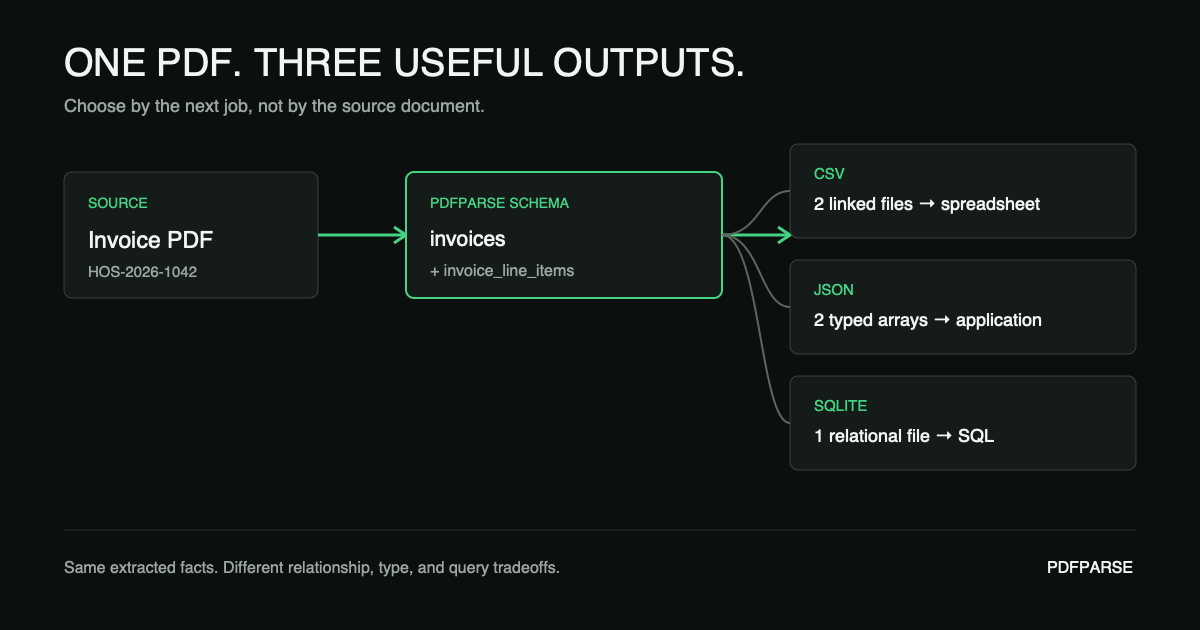
Extract the PDF once. Then choose the export that fits the next job. CSV works well for spreadsheet review, JSON for software integrations, and SQLite for developers or data teams that need the related tables in one queryable file.
This guide uses one synthetic invoice, one reusable PdfParse schema, and three export choices. The main path is written for any PdfParse user. Optional sections marked Advanced · For developers add command-line and SQL checks.
The answer in 30 seconds
| Choose | When the next step is | What you give up |
|---|---|---|
| CSV | Excel, Google Sheets, a flat-file import, or a human review | Explicit types and a built-in relationship between multiple tables |
| JSON | An API, script, application, queue, or webhook payload | Native joins, indexes, and database constraints |
| SQLite (advanced) | A developer or data team needs SQL analysis, validation, or several related tables in one file | A file that non-technical users can open directly in a spreadsheet |
If one workflow needs all three, do not extract the PDF three times. PdfParse allows you to create a schema once, keep the relational records together, and export the table or file required by each consumer in the expected format.
Download the complete comparison
The example uses invoice HOS-2026-1042 from the fictional Harbor Office Supply.
It contains no customer or personal data.
- Source invoice PDF
- Invoice table as CSV
- Line-item table as CSV
- Invoice table as JSON
- Line-item table as JSON
- Queryable SQLite database
- SQL schema and fixture data
- Reconciliation query
The downloadable SQLite file is a small educational fixture built from the same rows. A complete PdfParse project export may also contain project-specific tables and metadata, so do not treat this fixture as a byte-for-byte sample of every project export.
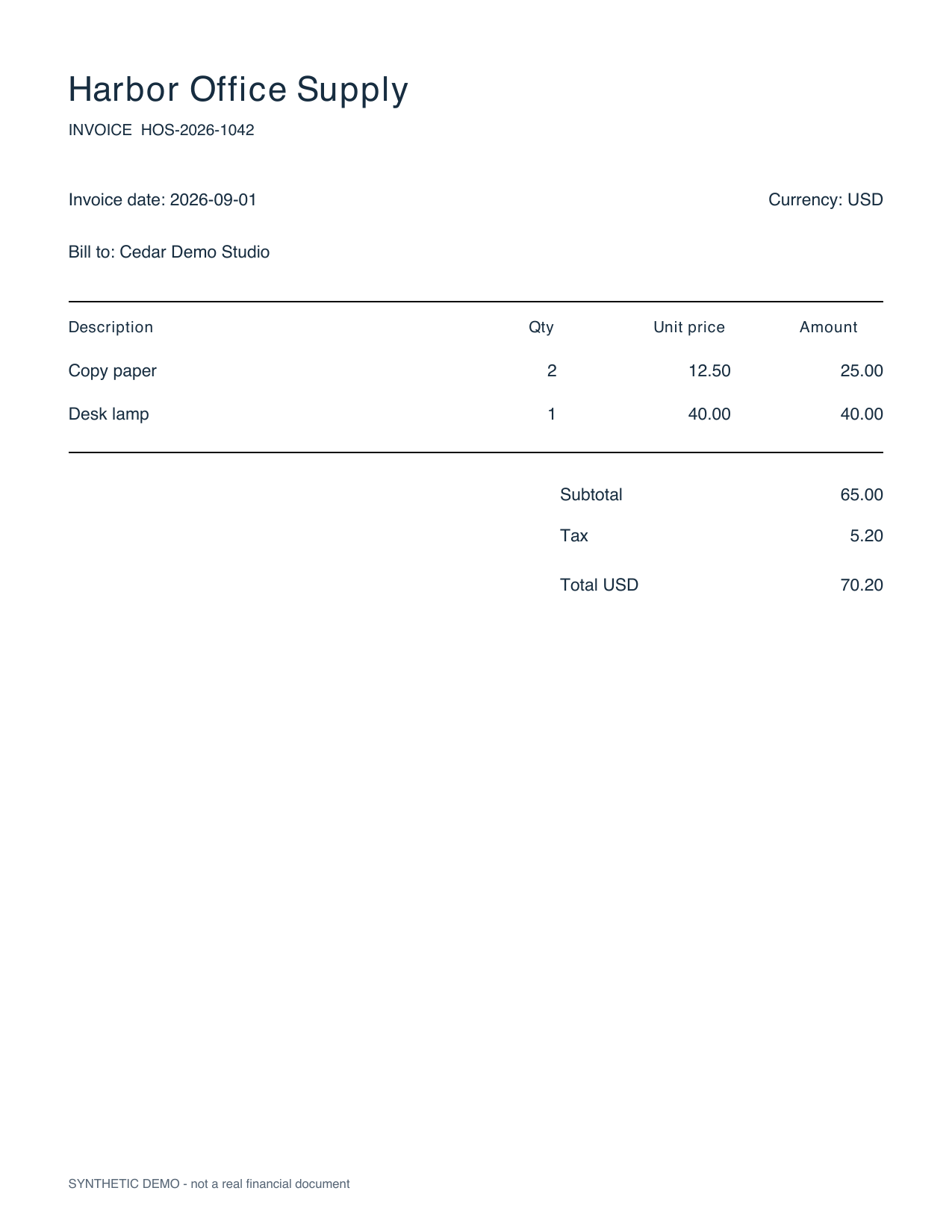
The ground truth is deliberately small enough to check by eye:
| Field | Printed value |
|---|---|
| Invoice number | HOS-2026-1042 |
| Invoice date | 2026-09-01 |
| Currency | USD |
| Copy paper | 2 × 12.50 = 25.00 |
| Desk lamp | 1 × 40.00 = 40.00 |
| Subtotal | 65.00 |
| Tax | 5.20 |
| Total | 70.20 |
Create a project and extract the invoice once
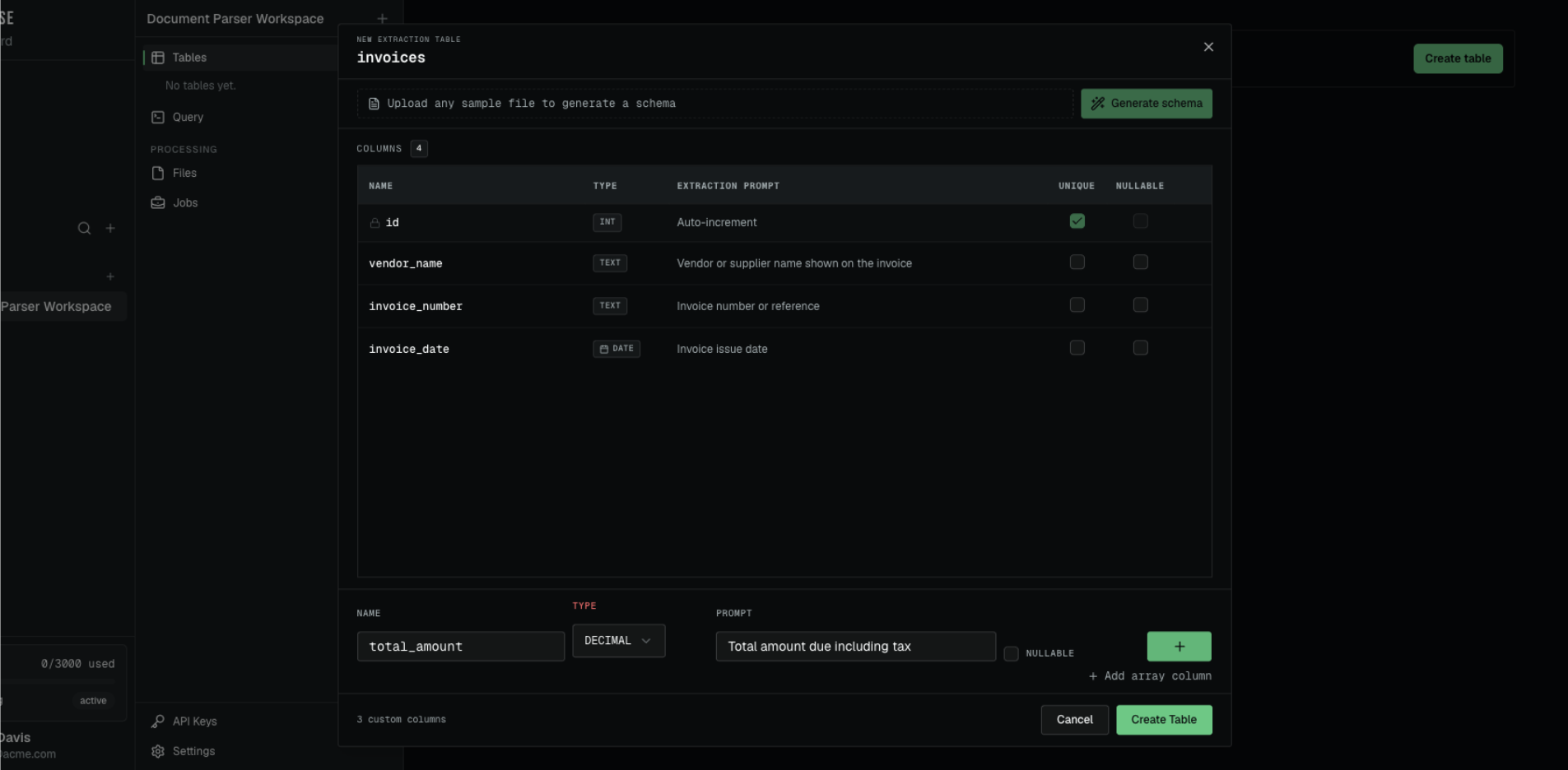
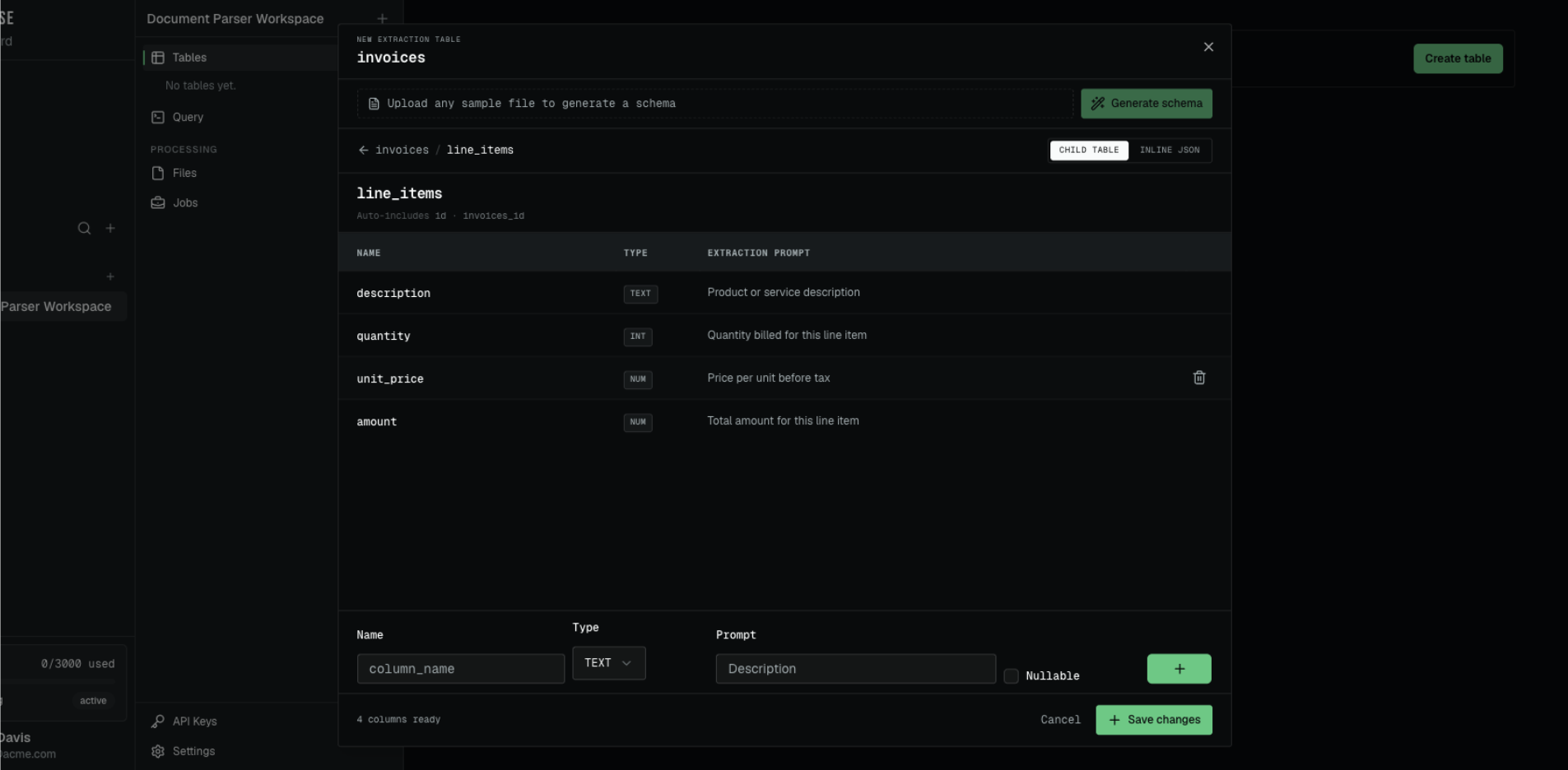
You do not need to design every field before uploading a document. PdfParse can use a sample PDF and a short instruction to suggest the tables, columns, and relationships for you.
- Create a PdfParse project.
- Select Create table and name the main table
invoices. - Upload the sample invoice under Upload a PDF to auto-generate schema.
- In the optional Focus prompt, describe what you need. For example: “Extract the invoice details and put repeating line items in a child table.”
- Select Generate schema.
- Review the suggested columns and the
invoice_line_itemschild table. Add, remove, or rename fields if your workflow needs something different. - Select Create Table, upload the files you want to process, and review the extracted rows beside the source document.
For a complete walkthrough of this setup step, read how to automate invoice data extraction with AI.
How the invoice and line items stay connected
Think of the relationship as a matching number. The invoice row has an id of
1. Each line item from that invoice receives the same value in
internal_fk_invoices_id. PdfParse creates that relationship column on the child
table automatically.
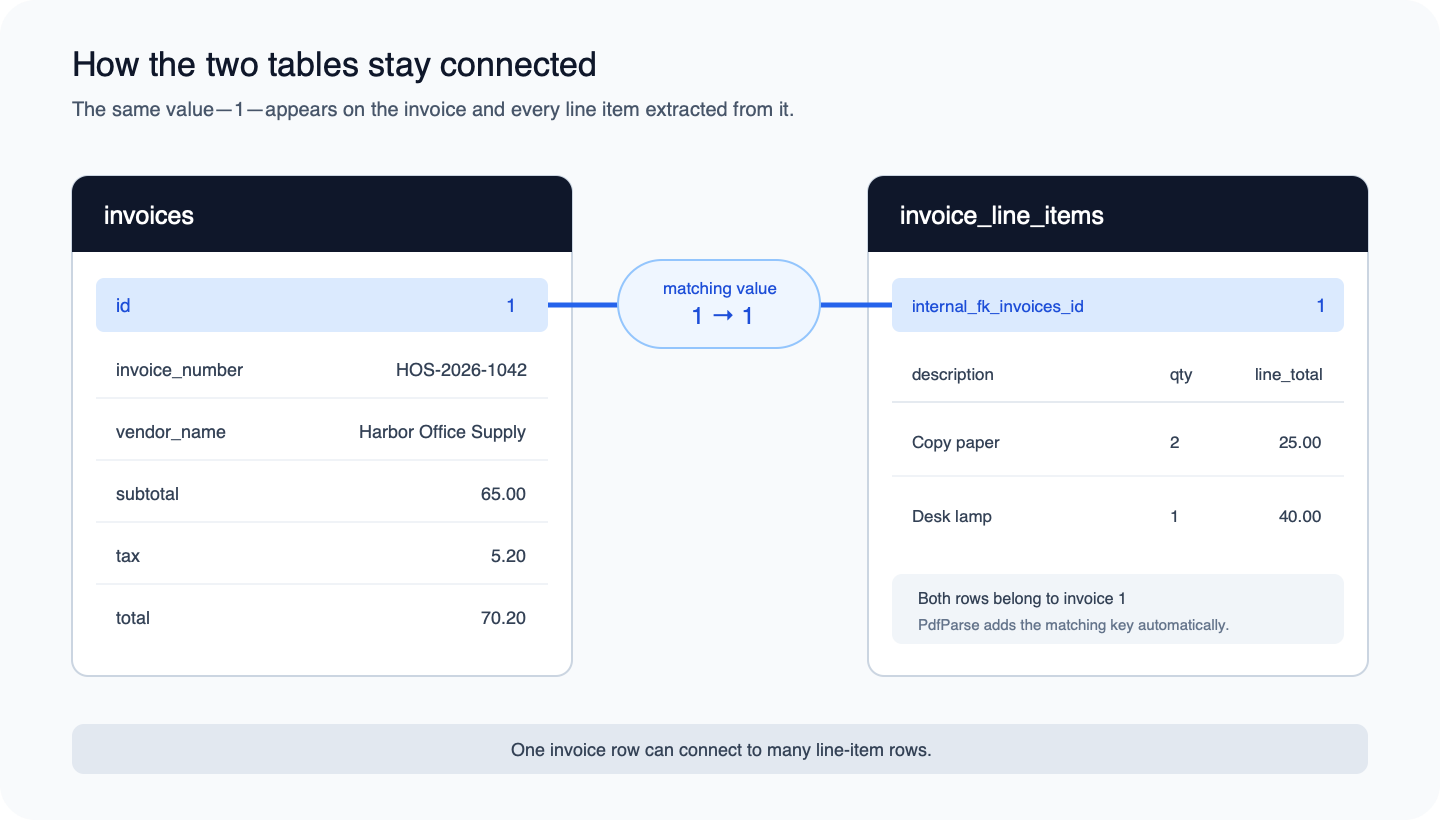
The column name describes the link: internal_fk_invoices_id means “the internal
key that points to an invoices row.” Most people never need to type that name;
it matters when exporting related tables or writing a query.
Export the result
After reviewing the extracted data:
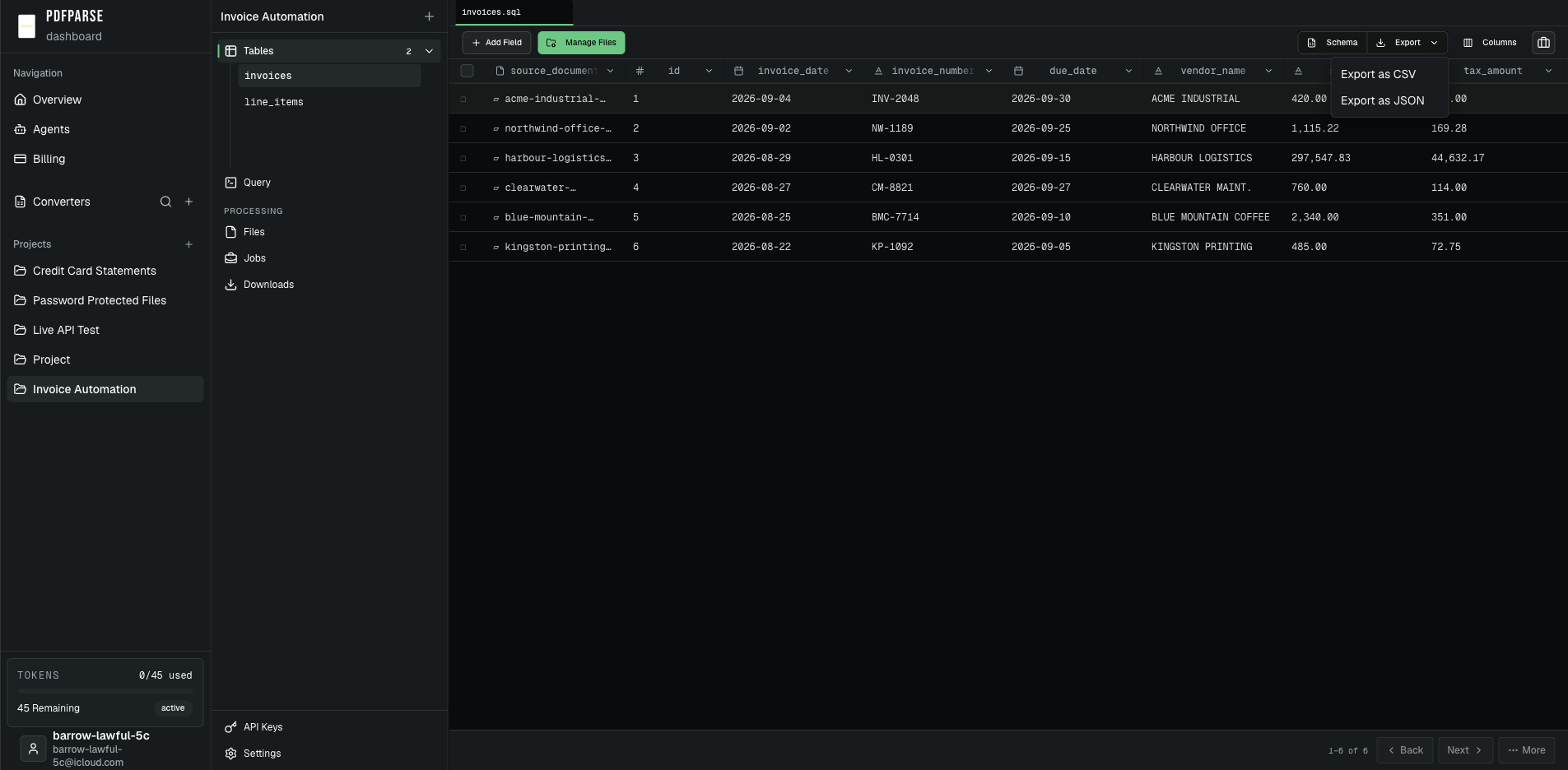
- Open the
invoicestable. - Select Export, then choose Export as CSV or Export as JSON.
- Open
invoice_line_itemsand repeat the export so the repeating rows are included. - If you need the complete project as a queryable database, open Project Settings, find Data Export, and choose Export SQLite Database.
The query console is useful for filtering or joining data before a handoff. It can display results as a table or JSON and lets you copy the results. It does not currently download query results as a separate export, so use the table view for CSV or JSON downloads.
CSV: two portable tables, one implicit relationship
For everyone: Choose this path when a person will review the extracted tables in Excel, Google Sheets, or another spreadsheet tool.
CSV is a record-oriented interchange format. Its common specification describes records made of fields and an optional header; it does not define database types, foreign keys, or nested objects (RFC 4180).
Exporting both tables therefore gives you two files. The parent file contains the invoice:
The child file contains two rows:
The value 1 in internal_fk_invoices_id points back to invoice row 1, but the
CSV files cannot enforce that rule. The recipient must preserve both files and
understand the key convention.
Validate CSV in a terminal
This is an optional integrity check. If you only need to review the files in Excel or Google Sheets, skip to Choose CSV when.
Download both CSV files into the same directory. This command adds the line-item totals without importing the file into a spreadsheet:
Expected result:
Then compare 65.00 + 5.20 with the parent row's 70.20 total. In a real
spreadsheet workflow, also protect identifiers from automatic number conversion,
check quoted commas and line breaks, and confirm the importer's date assumptions.
Choose CSV when
- A person needs to filter, sort, or correct one table in a spreadsheet.
- The destination has a mature CSV import flow.
- A flat extract is more useful than a complete relational dataset.
- The receiving team already knows how related files are keyed.
Do not choose CSV solely because it looks simpler. Once a document contains several repeating groups, “simple” can become a folder of files plus undocumented join rules.
JSON: typed values and application-friendly structure
For integrations and technical users: You do not need command-line skills to download JSON, but the receiving application or automation must know how to use it.
JSON can represent strings, numbers, booleans, nulls, objects, and arrays (RFC 8259). That makes it a natural boundary between extraction and application code.
PdfParse exports a selected table as a JSON array. The invoice table begins:
The line items are a second exported array:
The 1 in each line item's internal_fk_invoices_id matches the invoice's id.
An application can keep the two arrays separate or deliberately assemble a
nested response. Nesting is an application contract; it is not the same thing as
exporting a table.
Validate JSON with jq
This optional command checks the downloaded JSON without opening it in an application. Non-technical readers can skip to Choose JSON when.
Use jq to parse the complete file and total the two child records:
Expected result:
JSON preserves the distinction between a number and a string, but it does not
make 2026-09-01 a native date or guarantee decimal arithmetic in the receiving
language. Keep identifiers as strings, define nullability, and use an appropriate
decimal representation when exact money calculations happen downstream.
Choose JSON when
- A server, script, API, queue, or webhook will consume the records.
- The payload needs booleans, nulls, arrays, or nested application objects.
- One record must be transmitted without shipping a database file.
- The receiving system owns validation and relationship assembly.
JSON is an interchange format, not a substitute for a query engine. Repeatedly loading large files and walking arrays is a sign that the next step may need a database.
SQLite: one file with both tables and SQL
SQLite is the best fit here when you need joins, SQL validation, or a portable copy of the related tables. If your next step is a spreadsheet or a no-code workflow, choose CSV and skip this section.
SQLite keeps the schema and rows in one cross-platform database file. The SQLite documentation describes the complete database state as normally contained in a single main file, which is why it works well as a portable relational artifact (SQLite file format).
Open the downloadable fixture and inspect its tables:
Expected result:
Now join the extracted records:
The query returns the two line items without duplicating the invoice fields in
storage. SQLite supports foreign-key constraints, but applications should enable
their enforcement explicitly with PRAGMA foreign_keys = ON
(SQLite foreign keys). The downloadable
schema does this before creating and loading the fixture.
Reconcile the SQLite output with SQL
This query verifies both the line-item subtotal and the final total:
A clean result returns no rows. Run it with:
or paste the query directly into PdfParse's read-only project query view. For a complete portable copy, use the SQLite database export in Project Settings.
Choose SQLite when
- Parent and child tables must travel together.
- Analysts need joins, filters, aggregates, indexes, or repeatable checks.
- Many processed documents should remain queryable as one dataset.
- A local script or permission-scoped agent should retrieve only relevant rows.
SQLite is not the final destination for every system. A shared service with many concurrent writers may belong in PostgreSQL or another server database. SQLite is valuable here because it preserves a queryable relational handoff without requiring a database server.
What usually breaks after PDF extraction?
The decision becomes clearer when you compare failure modes instead of feature lists.
| Risk | CSV | JSON | SQLite |
|---|---|---|---|
| Leading-zero identifiers | Spreadsheet import may coerce them | Safe when encoded as strings | Safe in a text column |
| Dates | Text plus importer assumptions | Strings unless the application parses them | Commonly stored as text and handled by schema/query conventions |
| Missing values | Empty field can be ambiguous | null and a missing key can differ | NULL plus optional constraints |
| Parent-child data | Multiple files and a key convention | Multiple arrays or deliberate nesting | Tables, joins, and optional foreign-key enforcement |
| Exact money arithmetic | Depends on the spreadsheet/import | Depends on the consumer's numeric model | Depends on the chosen schema and query logic |
| Large repeated analysis | Import first | Parse and scan or load elsewhere | Query directly with indexes when needed |
None of the formats repairs an incorrect extraction. Review source-linked rows, validate required fields, count repeating records, and reconcile totals before the export becomes an input to another system.
A practical decision sequence
Ask these questions in order:
- Will a person open one table in a spreadsheet? Choose CSV.
- Will software receive or transmit records? Choose JSON.
- Must several tables remain connected and queryable? Choose SQLite.
- Will the data become a shared production system? Use the chosen export as a staging format, then load it into the system of record.
The source PDF does not answer those questions. The consumer, data shape, and validation burden do.
Where PdfParse changes the decision
PdfParse separates extraction from delivery format. You define typed tables and relationships once, process the documents against that schema, review the rows beside their sources, and then choose the handoff:
- export an individual table as CSV for spreadsheet work;
- export an individual table as JSON for software integration;
- query the related project tables or export the complete SQLite database.
That is the product advantage this comparison exposes: the structure is not discarded just because one recipient needs a flat file. The same extraction can serve finance, application, and data workflows without recreating the document pipeline for each format.
For a deeper modeling decision, compare JSON arrays with child tables.
Common questions
Is JSON always better than CSV for extracted PDF data?
No. JSON carries explicit primitive value types and richer structures, but CSV is usually easier for a spreadsheet user or an import tool built around rows and columns. The least complicated format for the recipient is often the right one.
Can CSV preserve parent and child tables?
Yes, as separate files with stable relationship keys. CSV cannot enforce the relationship, so include both files, document the key, and test for missing parents or children after import.
Does JSON automatically preserve database relationships?
No. JSON can nest records or carry matching IDs, but the application defines and validates that relationship. A JSON object does not enforce a foreign key.
Why choose SQLite instead of PostgreSQL?
Choose SQLite for a portable, serverless handoff that one person, process, or agent can query locally. Choose PostgreSQL or another server database when the workload needs shared access, multiple concurrent writers, centralized operations, or infrastructure-level controls.
Can one PdfParse project use all three formats?
Yes. CSV and JSON are table exports, while SQLite preserves the complete project database. Choose the output separately for each downstream consumer; you do not need to reprocess the source PDF.
Try the workflow with your own document
Use the record types overview to define a reusable schema and review source-linked rows. If you already know the destination, continue with PDF to CSV, PDF to JSON, or PDF to SQLite.